



Quick Facts:
- Topic: Buying, powering, mounting, and setting up a Starlink Mini for camping and overlanding.
- Price: $149 from Starlink in the US, the lowest price to own a Mini since its 2024 launch.
- Referral reward: New customers get $100 after two months of qualifying service, an effective $49 for the hardware.
- Size and weight: 11.75 x 10.2 x 1.45 inches and 2.43 pounds.
- Power: 20 to 40 watts on average, from 12 to 48 volts DC or 100-watt USB-C PD.
- Plan for weekend trips: Roam 100GB at $55 per month.
- Mount I use most: Flagpole Buddy Mini Starlink Flat Mount with the magnet option.
- Best for: Campers, overlanders, and remote workers who travel beyond cell coverage.
14 min read
In This Guide
- Why I Rely on Starlink Mini for Camping
- Buy the Starlink Mini Now or Wait for the Mini 2?
- Starlink Mini Key Specs for Camping
- What a Starlink Mini for Camping Costs
- Starlink Mini vs. Standard Kit
- Powering a Starlink Mini for Camping Off the Grid
- Mounts for a Starlink Mini Overlanding Rig
- Carry Cases and Dish Protection
- Starlink Mini Setup at Camp, Step by Step
- Line of Sight: Where to Place the Dish
- Starlink Mini for Camping Best Practices
- Common Problems and Fixes
- Final Thoughts
- FAQ
Why I Rely on Starlink Mini for Camping
I’ve used Starlink for nearly five years, and it’s hands down one of the most valuable tools in my kit. Everybody’s needs differ, though. This guide covers the Starlink Mini for camping from the buying decision to a working dish at camp. Right now, the Mini also costs less to own than ever before.
Here’s why I carry it. First, I run several online brands, and work does not stop at the trailhead. Second, I want a line to family and friends when I’m off-grid. Third, when cell service drops out, Starlink keeps Google Maps and Google Earth working, so I find my route and scout campsites.
The Mini weighs 2.43 pounds and draws 20 to 40 watts on average, according to Starlink. As a result, it runs from a portable battery or your truck’s 12-volt system. Compared to a cell booster, it needs no tower at all, because it talks to satellites overhead. For vehicle campers, its size and power draw make it an easy fit for satellite internet for camping.
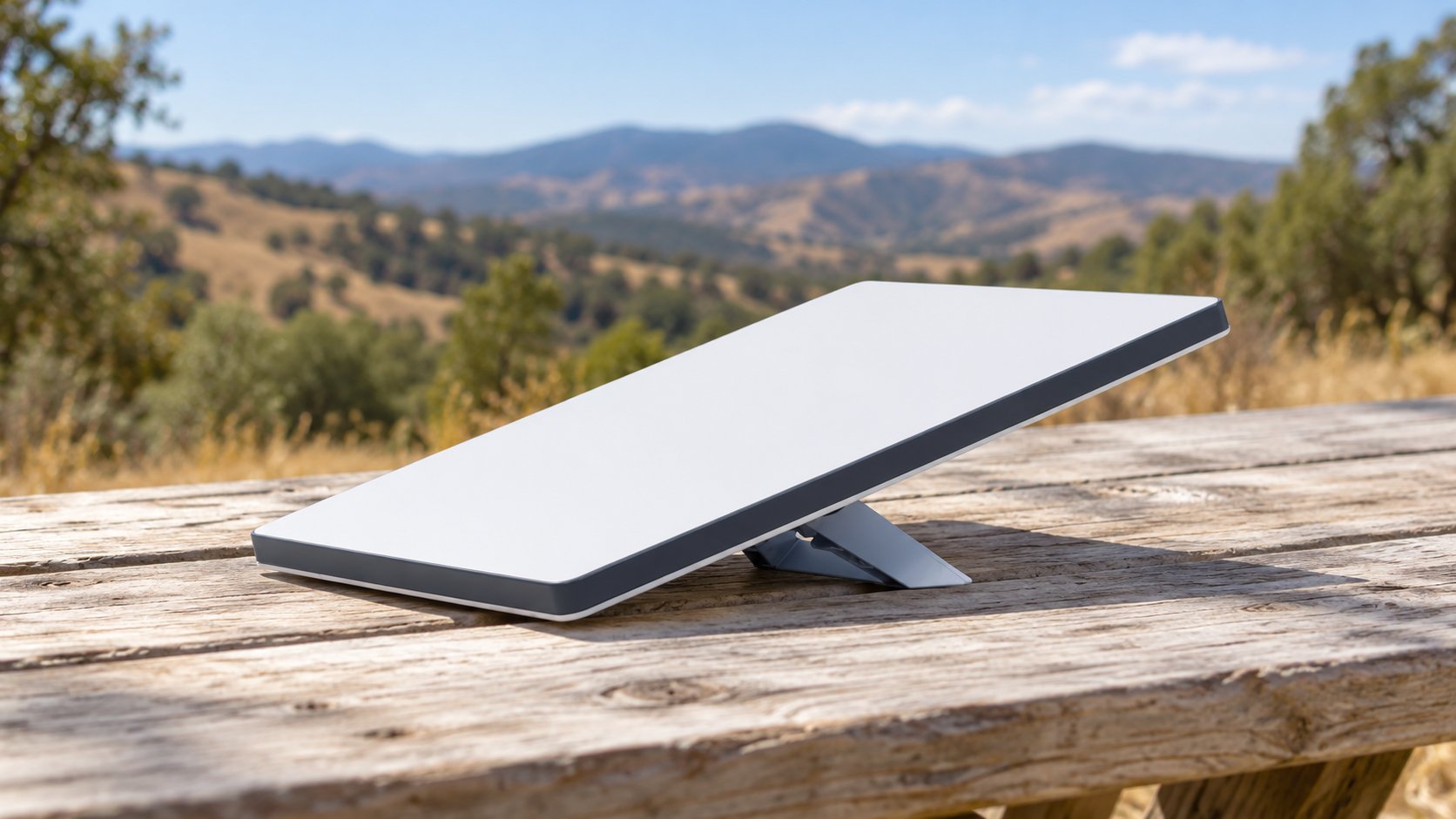
In October 2026, Starlink cut the Mini kit from $199 to $149. If you’re a new customer and order through a referral link, you get a $100 reward after two months of qualifying service. After the reward, the hardware works out to an effective $49.
Disclosure: if you buy through our Starlink referral link and qualify, you receive $100, and 4wdTalk receives the same $100 reward. We also earn from qualifying Amazon purchases linked in this guide.
Buy the Starlink Mini Now or Wait for the Mini 2?
I answer this question in a full 4wdTALK video. Watch it below, then read on for the short version.
Referral offer: $149 upfront kit price minus a $100 referral reward equals $49 effective kit cost. Reward follows two months of qualifying paid service. Service fees, shipping and tax are extra. New eligible U.S. customers must order direct through our referral link on a qualifying plan. Reward defaults to service credit; cash where available. 4wdTalk also earns a reward. Price and availability may vary. Starlink terms apply.
The Mini 2 is not official yet. SpaceX has posted no product page, price, or release date. Instead, the details come from firmware and hardware leaks, including a built-in battery and USB-C charging. The same leaks point to slower sustained uploads, with a transmit duty cycle of 11% against 75% on the current Mini. Duty cycle is the share of time the dish spends sending data.
My take is simple: buy now if you have trips on the calendar. A proven Mini for an effective $49 is hard to pass up, especially while the Mini 2 has no price or date. Because the current Mini launched in 2024, mounts, batteries, and cases for it are everywhere. Also, if you upload video or take work calls from camp, the leaks favor the current Mini. Wait for official Mini 2 details only if a built-in battery tops your list. For the full leak breakdown, read our coverage of the Starlink Mini 2 firmware leak.
Gear to Pair With Your Mini
Power and carry gear shapes how smoothly a first trip goes, especially off the grid. The table below compares two Mini batteries, the Devos AMPak 145 and PeakDo LinkPower 2. It also covers the STARGEAR USB-C to DC cable and the Daqa Ultra-Light EVA case. Later sections explain each pick.
| Longest Runtime | Compact Battery | Power Cable | Carry Case | |
|---|---|---|---|---|
| Product | TOP PICK Devos AMPak 145 Devos AMPak 145 |  PeakDo LinkPower 2 PeakDo LinkPower 2 |  STARGEAR USB-C to DC Cable STARGEAR USB-C to DC Cable |  Daqa Ultra-Light EVA Case Daqa Ultra-Light EVA Case |
| Rating | ★★★★☆ 4.0 6 ratings | ★★★★☆ 3.7 75 ratings | ★★★★☆ 4.5 102 ratings | ★★★★★ 4.8 618 ratings |
| Type | Battery base | Battery pack | USB-C to DC cable | EVA carry case |
| Key spec | 145 Wh, up to 7 h at 20 W | 99 Wh, up to 5 h at 20 W | 100 W PD, 6.5 ft | Holds dish, kickstand, adapter, cables |
| Weight | 1.9 lb | 1.47 lb | About 3 oz | 1.7 lb |
| Price | $199.99 as of Oct 21, 5:34 pm | $206.10 as of Oct 21, 3:30 pm | $17.99 as of Oct 22, 12:31 am | $35.98 as of Oct 21, 6:36 pm |
| Check Price → | Check Price → | Check Price → | Check Price → |
Starlink Mini Key Specs for Camping
These numbers come from Starlink’s Starlink Mini specification sheet and support pages.
| Specification | Details |
|---|---|
| Dish size | 11.75 x 10.2 x 1.45 in |
| Weight | 2.43 lb (2.56 lb with kickstand) |
| Field of view | 110 degrees |
| Average power draw | 20 to 40 W (15 W idle) |
| Power input | 12 to 48 V DC at 60 W max, or 100 W USB-C PD (20 V, 5 A) |
| Wi-Fi | Built-in Wi-Fi 5 router, up to 1,200 sq ft, 128 devices |
| Weather rating | IP67, -22°F to 122°F, wind 60+ mph, snow melt up to 1 in per hour |
| In-motion use | Supported on Roam plans up to 100 mph |
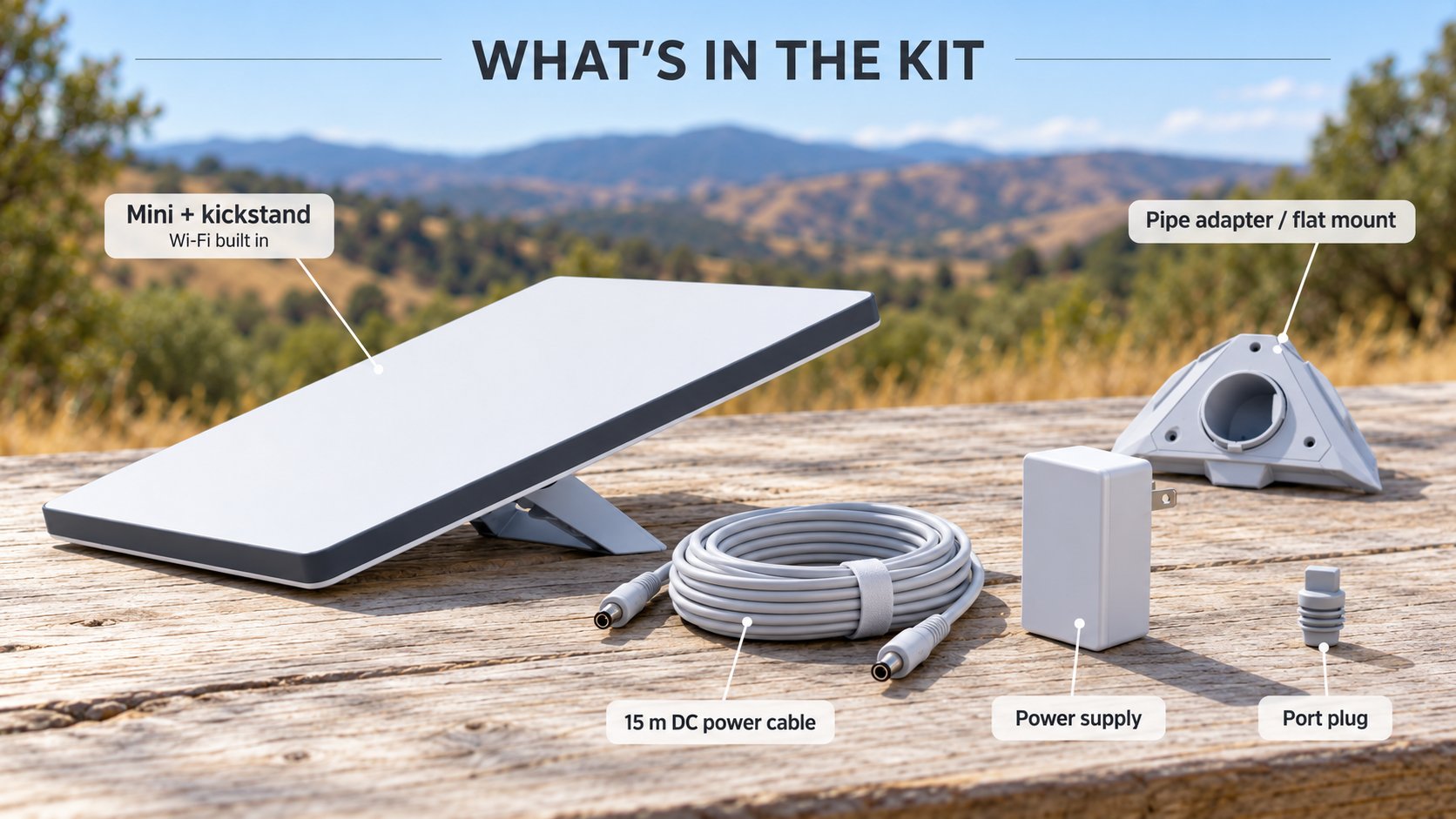
| In the box | Dish, kickstand, pipe adapter and flat mount, 49.2 ft DC cable, power supply |
| Price | $149 direct from Starlink (October 2026) |
What a Starlink Mini for Camping Costs
Starlink sold the Mini for $599 at launch in June 2024. After a string of cuts, the price fell from $199 to $149 on October 2, 2026. As a result, $149 is the lowest price Starlink has charged to own a Mini in the US. In early October 2026, retailers such as Best Buy listed the kit near $249.
The referral reward stacks the savings further. Under Starlink’s referral program rules, you and the referrer each receive $100 after you subscribe for two months. Check the conditions first. You must be a new customer, order on starlink.com through the link, and keep a Residential or Roam plan active. The reward defaults to service credit, although your web account lets you choose cash instead. Tax and shipping sit on top of the $149.
Here’s the math on Roam 100GB. The $149 kit plus two months at $55 comes to $259. After the $100 reward, you’re at $159 before tax and shipping.
Pick the Right Starlink Roam Plan
The hardware is the small number. Your Starlink Roam plan is the bill you keep paying, so choose it based on how often you travel.
| Plan | Monthly Price | Best For |
|---|---|---|
| Roam 100GB | $55 | Weekend trips, about one week of typical use, per Starlink |
| Roam 300GB | $80 | Several trips a month |
| Roam Unlimited | $175 | Full-timers and travelers outside the US and Canada |
| Standby Mode | About $10 | Between trips, low-speed data up to 500 Kbps |
I’ve tested Starlink’s plans from the $10 tier up to Unlimited. For my weekend warrior trips, the $55 Roam 100GB plan works perfectly. After you pass the data cap, the dish drops to unlimited low-speed data for email, calls, and texts. Starlink no longer sells extra data by the gigabyte on Roam. Until your next billing cycle, only an upgrade to Unlimited restores full speed. Not sure yet? Starlink also offers a 30-day trial with a full refund.
Starlink Mini vs. Standard Kit
Before you order, weigh the Mini against the Standard 4 X kit, Starlink’s bigger rectangular dish. It measures 23.4 x 15.07 inches and weighs 6.4 pounds, against 2.43 pounds for the Mini. More important for campers, the Standard draws 75 to 100 watts, while the Mini averages 20 to 40 watts. The Standard also runs from an AC power supply and a separate Router 3, so you carry more parts.
Still, the Standard has real advantages. Its Wi-Fi 6 router covers up to 3,200 square feet, compared to 1,200 for the Mini. Both dishes share a 110-degree field of view and an IP67 rating. In addition, each supports in-motion use on Roam, unlike the motorized Standard Actuated. Therefore, the Standard makes sense for a large RV or a fixed basecamp with a big battery bank.
For a truck, SUV, or rooftop tent, the Mini wins on size, weight, and power. A cell booster is another choice, although a booster still needs a weak tower signal to amplify. Where no signal exists at all, a booster has nothing to amplify, and satellite internet for camping is the only option.
Powering a Starlink Mini for Camping Off the Grid
Power is where most first trips go wrong. The Mini accepts 12 to 48 volts DC at up to 60 watts, or USB-C Power Delivery at 100 watts (20 volts, 5 amps). According to Starlink, it will not run from USB-C PD sources rated 65 watts or lower. Because of this limit, a phone charger or a 65-watt laptop brick will not work.
To estimate runtime, divide battery watt-hours by the average draw. For example, a 576 Wh battery at 20 watts gives roughly 29 hours on paper, before conversion losses. Snow melt and hot weather raise the draw, so plan with margin.
Power Stations I Use for Camping With Starlink Mini
For extended power, I run my Mini from EcoFlow and Bluetti power stations. Both brands offer 100-watt USB-C ports and 12-volt car outlets. For instance, the EcoFlow DELTA 2 Max holds 2,048 Wh, and the Bluetti Elite 200 V2 holds 2,073.6 Wh. At a 30-watt average, either covers roughly 68 to 69 hours on paper.
Dedicated Mini Batteries: Devos, PeakDo, and Star-Batt
I’ve used all three of these dedicated batteries with my Mini, and each fits a different trip:
- Devos AMPak 145: 145 Wh, up to 7 hours at 20 watts, 1.9 pounds, and $199.99. It clicks into the dish as a kickstand base.
- PeakDo LinkPower 2: 99 Wh, up to 5 hours at 20 watts, $229 direct, with pass-through charging, an IP65 rating, and airline approval under 100 Wh.
- Star-Batt Plus: 576 Wh LiFePO4 inside a Pelican 1450 case, 22 pounds, $1,599, rated for 24 hours or more.
In our Star-Batt Plus runtime test, the battery ran the Mini for 27 hours and 27 minutes with 8.3% left. The Devos and PeakDo suit day trips and short sessions. By contrast, the Star-Batt covers a full weekend without a recharge.
Cable quality matters too. Use Starlink’s cable or a USB-C to DC cable rated for 100 watts, such as the STARGEAR cable I’ve used. If a 12-volt setup drops out, Starlink suggests a shorter cable, a thicker gauge, or a higher voltage.
Mounts for a Starlink Mini Overlanding Rig
The kickstand works at camp, but a mount keeps the dish online while you drive. On a Roam plan, Starlink supports in-motion use up to 100 mph in authorized areas. In-motion use is not allowed on Residential plans or in Standby Mode.
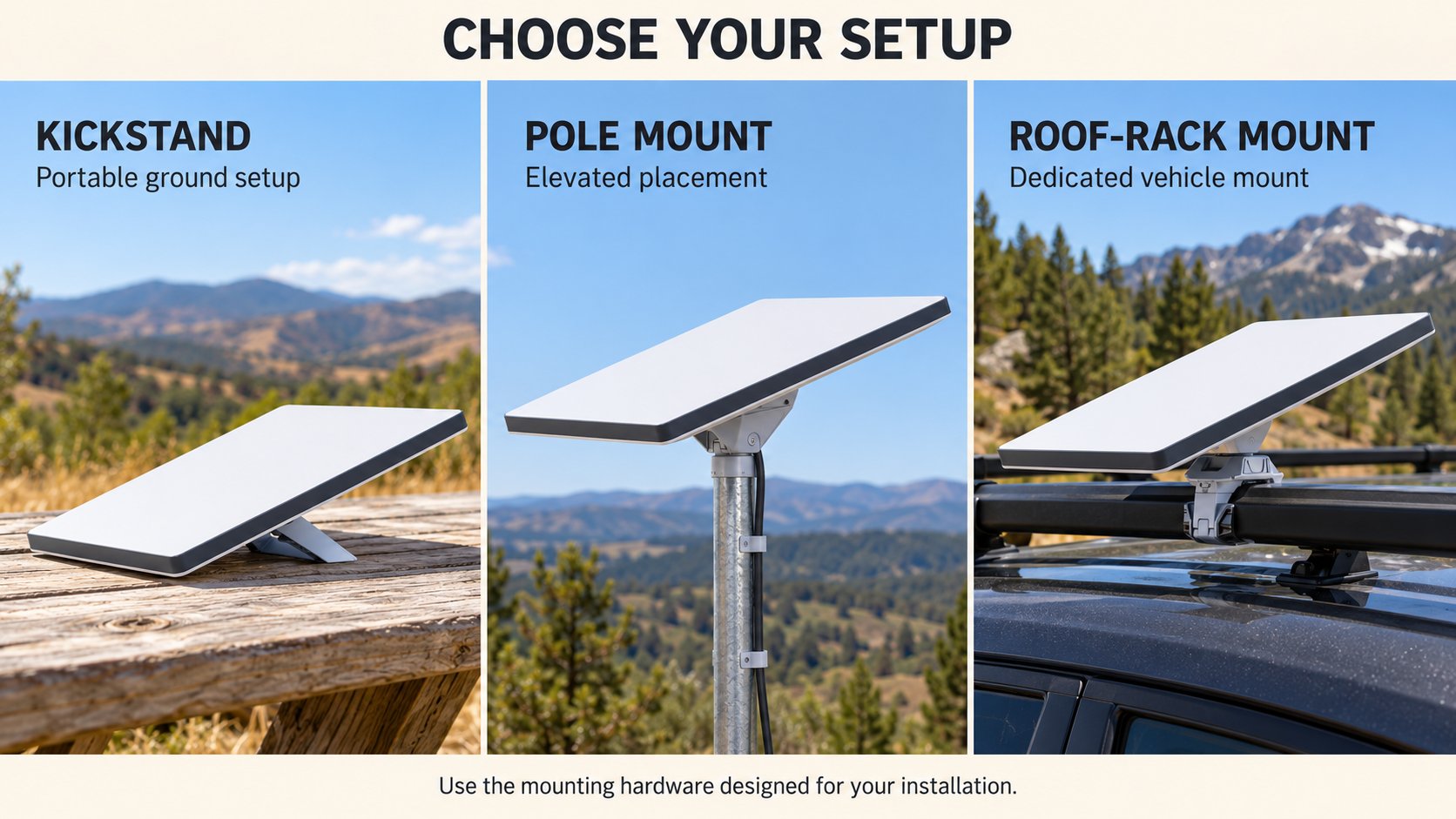
My favorite, and the mount I use most, is the Flagpole Buddy Mini Starlink Flat Mount with the magnet option. Disclosure: Flagpole Buddy is a 4wdTalk partner. It holds the dish flat on the roof with four 2.5-inch magnets, each rated for 65 pounds. The body is 3D-printed PETG, and Flagpole Buddy backs it with a 2-year warranty. For aluminum or fiberglass roofs, Flagpole Buddy also sells flush-mount and suction versions. Our full Starlink Mini magnetic mount review covers fit on grooved truck roofs.
For a Starlink Mini overlanding setup at camp, height beats everything else. Flagpole Buddy’s Hitch Mount Kit ($180.99) raises the dish on aluminum poles from your hitch receiver. Meanwhile, the pipe adapter in the Starlink box fits poles from 1.25 to 2 inches in diameter. Starlink also sells a Roof Rack Mount for flat crossbars, though not round bars.
Every rig shares a few mounting rules. Starlink recommends a tether with all mounts, so add one. Install the dish facing forward, obey posted speed limits, and pull it off before a car wash.
Carry Cases and Dish Protection
A $149 dish still deserves protection on washboard roads. My Mini now rides inside the Star-Batt Plus most of the time. Its Pelican 1450 shell carries an IP65 rating, so the dish and battery travel as one sealed unit.
Before the Star-Batt, I used the cases in our tested Starlink Mini accessories guide. The Daqa Ultra-Light EVA Case weighs 1.7 pounds and costs $35.98. It holds the dish, kickstand, power adapter, and cables. Also, a STARGEAR silicone cover protects the dish face from hail and scuffs while it sits deployed.
If you fly with the dish or pack a crowded truck bed, a hard case gives more protection. For example, the MEKEET hard case uses an ABS shell, weighs about 4.2 pounds, and sells for $39.99. Starlink also sells a Mini Travel Kit with a bumper case, a sleeve, and an accessory pouch.
Starlink Mini Setup at Camp, Step by Step
A smooth Starlink Mini setup starts at home, not at the trailhead. These five steps follow Starlink’s own Mini setup guide, plus field tips from Mini owners.
Step 1: Activate the Mini Before Your Trip
Download the Starlink app and scan the QR code on the box. Then power the dish in your driveway and let it connect for the first time. The dish downloads software updates while it has power and open sky. Do this with time to spare, not at a dark campsite.
Step 2: Scout the Sky With the Obstruction Tool
Before you level the truck, open the app’s obstruction tool and scan the sky from your chosen spot. The tool maps trees, poles, and roof edges inside the dish’s view. If ground level looks blocked, move the dish or raise it on a pole.
Step 3: Set the Kickstand and Connect Power
First, lift the kickstand and push the cable in until the plug face sits flush. Next, connect your power source: the included supply, a battery, or a 12-volt adapter. Any USB-C source must deliver 100 watts. A slow blinking light means the dish has power.
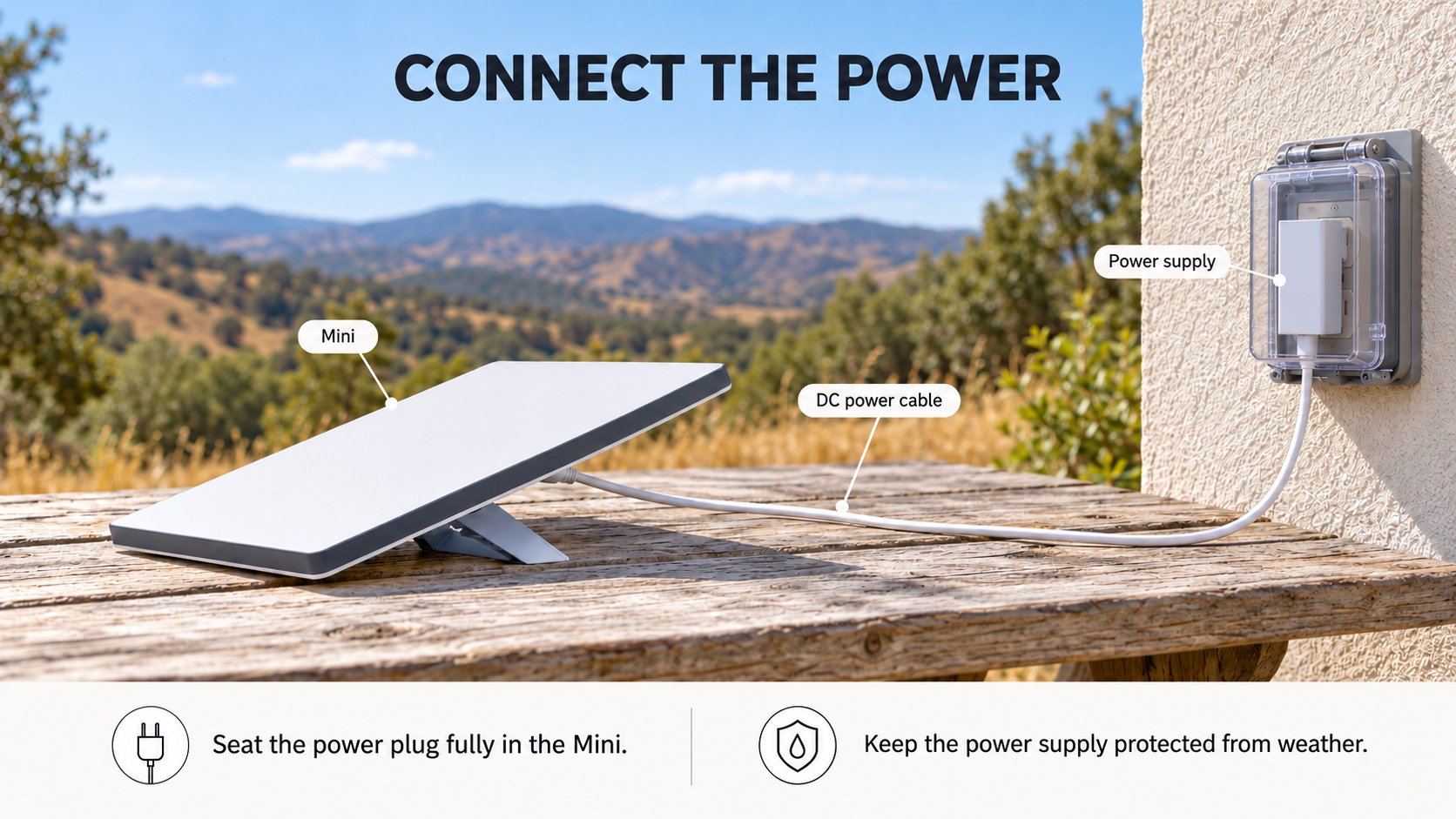
Step 4: Rotate the Dish to Match the App
Because the Mini has no motors, you turn it by hand. The app shows an alert if the dish points 5 degrees or more off target. Rotate it until the alert clears, and then leave it alone.
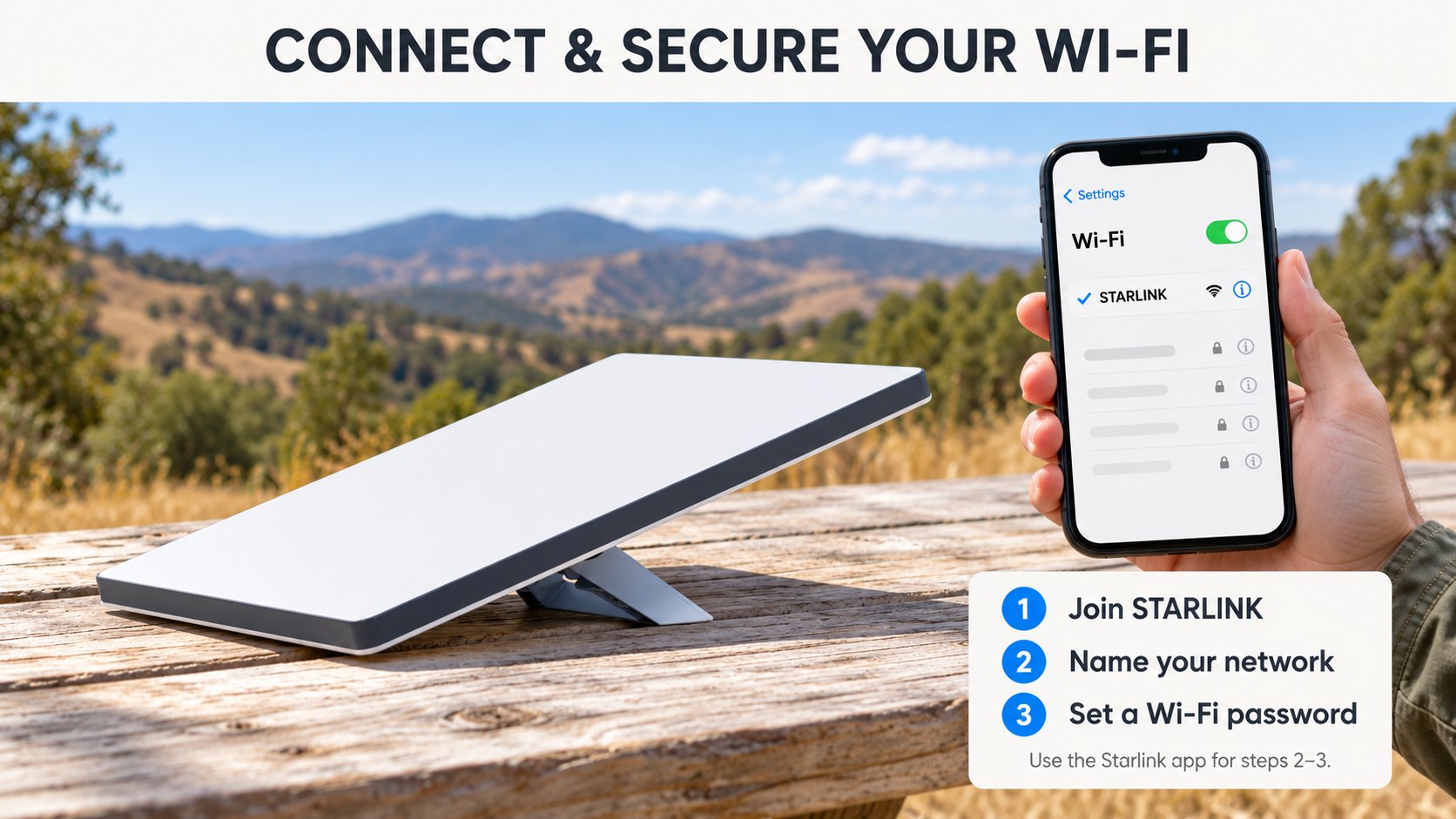
Step 5: Secure Your Wi-Fi Network
First, join the network named STARLINK. After you connect, rename it and set a password under Settings, then Router. This step keeps the campers in the next site off your data plan.
Multi-day camps need steady power, because the Mini draws 20 to 40 watts on average. For example, I run my Mini from EcoFlow and Bluetti power stations. The EcoFlow DELTA 2 Max below holds 2,048 Wh and has two 100-watt USB-C ports. With the right cable, those ports meet the Mini’s USB-C PD requirement.

EF ECOFLOW Portable Power Station DELTA 2 Max 2048Wh, 2400W LiFePO4 Battery | 2400W LFP Solar Generator, Full Charge in 1 Hr, Solar Powered Generator for Home Backup Camping RV, Solar Panel Optional
A 2,048 Wh LFP station with two 100 W USB-C ports, enough to run a Mini for days.
- 2,048 Wh LFP capacity
- Two 100 W USB-C ports for the Mini
- 12 V car outlet for the adapter route
- About 68 hours of Mini runtime on paper at 30 W
- Heavy at about 50 lb
- Costs far more than a dedicated Mini battery
See the Mini offer →
Referral offer: $149 upfront kit price minus a $100 referral reward equals $49 effective kit cost. Reward follows two months of qualifying paid service. Service fees, shipping and tax are extra. New eligible U.S. customers must order direct through our referral link on a qualifying plan. Reward defaults to service credit; cash where available. 4wdTalk also earns a reward. Price and availability may vary. Starlink terms apply.
Line of Sight: Where to Place the Dish
When you set up a Starlink Mini for camping, line of sight decides your signal more than any other factor. The Mini sees a 110-degree cone of sky, and satellites move across it all day. Since satellites keep moving, a single tree branch inside the cone causes repeated drops. Owners in forum threads describe frequent dropouts at shaded sites.
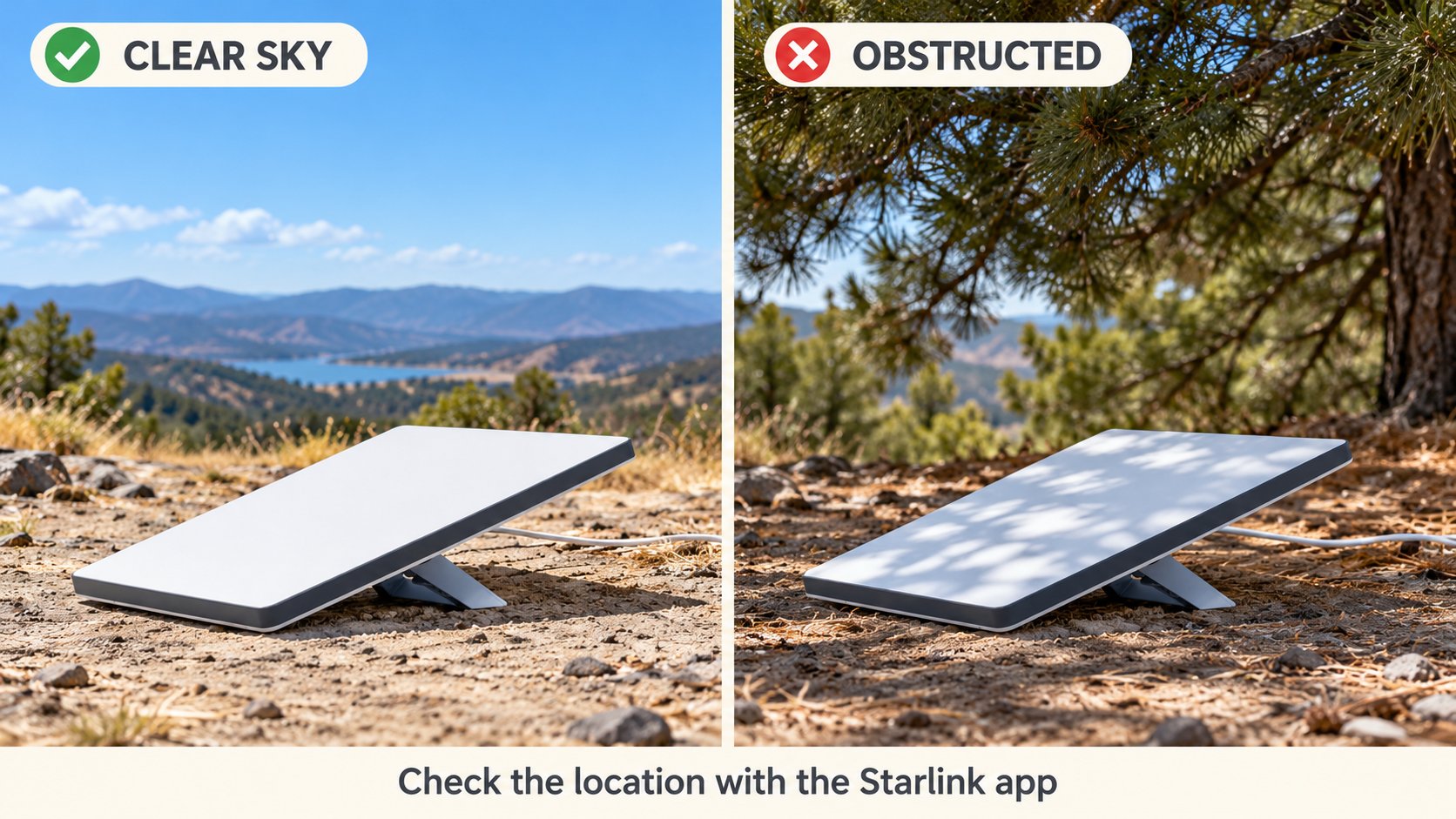
Here’s how to place the dish at a campsite:
- Park in the shade, but put the dish in the clearing, since the 49.2-foot cable gives you room to separate them.
- Keep canyon walls, cliffs, and tall trees out of the cone, especially on the side the app points you toward.
- Raise the dish on a pole when ground level is blocked, because a few extra feet clears brush and vehicles.
- Keep it out from behind glass, since windshields and metallic window tint block or weaken the signal.
- Space two dishes at least 10 feet apart, center to center, per Starlink’s setup guide.
Run the obstruction check again whenever you move camp. For dense forest sites, our guide to keeping Starlink connected under trees walks through more placement tricks.
Starlink Mini for Camping Best Practices
With a Starlink Mini for camping, good habits save data, power, and frustration. These practices help on every trip.
- Use maps while you have signal. With Starlink up, I pull up Google Maps and Google Earth to find trails and campsites. Also, download offline maps as a backup before you leave home.
- Budget your data, since Starlink rates 100GB at about one week of typical use. Pause streaming and large uploads near the cap.
- Switch to Standby Mode between trips. It keeps low-speed data for emergencies, while Starlink bills a full plan only when you resume.
- Watch the heat. A thermal throttling alert means the dish is near its limit. Move it out of trapped heat, and shade the power supply.
- Leave Snow Melt on Automatic. It clears up to 1 inch of snow per hour, although it adds to the power draw.
- Extend your Wi-Fi when needed. The built-in router covers up to 1,200 square feet, so a trailer or distant tent needs a travel router.
- Power down the dish when nobody is online, because it still draws about 15 watts at idle.
- Bring the dish inside at night if you camp near other groups, since a small dish is easy to steal.
- Carry a satellite messenger for SOS, because a dead battery or a blocked sky takes the Mini offline.
Common Problems and Fixes
Most problems trace back to sky, power, or data. Use these fixes for the common ones:
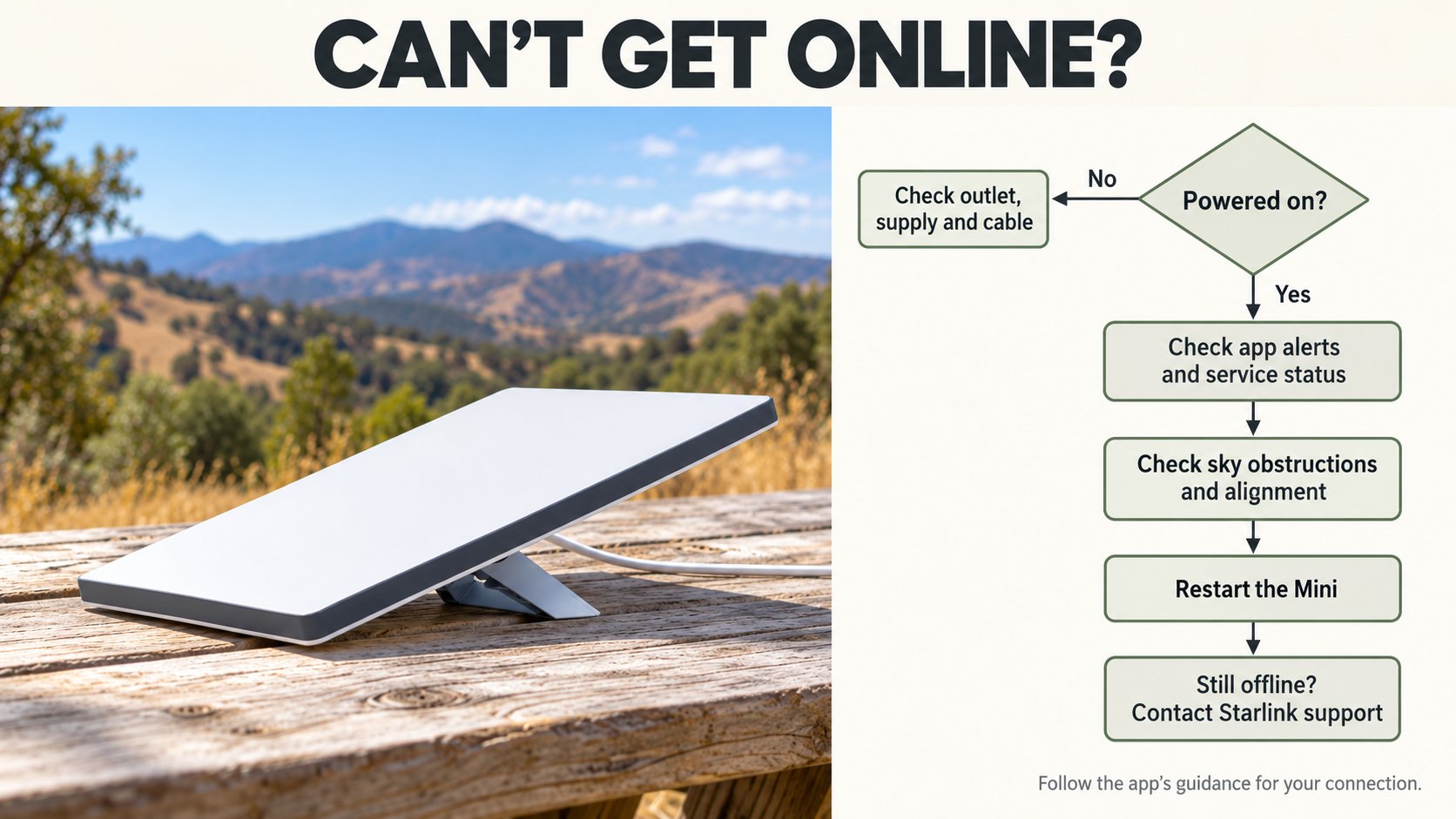
- Frequent dropouts: run the obstruction tool, then move the dish into the clearing or raise it.
- Misaligned alert: rotate the dish until the alert in the app clears.
- Power disconnect alert: check for a USB-C source under 100 watts, a loose plug, or a long, thin 12-volt cable.
- Thermal throttling: move the dish out from behind glass or any enclosed space, and let it cool.
- Slow speeds midmonth: check your data, since Roam 100GB and 300GB drop to low speed past the cap.
- Still stuck: reboot the dish from the app first. If the problem stays, factory reset it by holding the reset button on the back for 3 seconds.
- Still offline: open a ticket through the Starlink Help Center in the app or on the web.
Final Thoughts
After nearly five years on Starlink, the biggest payoff for me is staying reachable. My businesses keep running, my family reaches me, and my maps keep working when the bars disappear. If you camp, overland, or work from the road, the Starlink Mini is the easiest way I know to stay connected past the last cell tower. It also packs a full satellite system and router into a 2.43-pound dish.
The Mini has trade-offs. You pay for a monthly plan on top of the hardware, and trees or canyon walls cause dropouts. Also, you need a real power plan, because 65-watt chargers will not run it. If you want a built-in battery and plan to travel light, waiting for official Mini 2 details makes sense.
For everyone else, $149 is the lowest price Starlink has ever charged to own a Mini. With the referral reward, the hardware costs an effective $49. Pair it with Roam 100GB, a Flagpole Buddy mount, and a battery sized for your trips, and you have a complete kit.
FAQ
Is the Starlink Mini worth it for camping?
For most campers who travel beyond cell coverage, yes. At $149, or an effective $49 with the referral reward, owning a Mini has never cost less. Your main ongoing cost is a Roam plan, starting at $55 per month for 100GB.
Which Starlink Roam plan is best for weekend camping?
Roam 100GB at $55 per month fits most weekend trips. Starlink rates it at about one week of typical use. If you travel several times a month, step up to Roam 300GB at $80.
How long will a Starlink Mini run on a battery for camping?
Divide the battery’s watt-hours by an average draw of 20 to 40 watts. For example, the 145 Wh Devos AMPak 145 lists up to 7 hours at 20 watts. In our test, the 576 Wh Star-Batt Plus ran for more than 27 hours.
Does the Starlink Mini work while driving?
Yes, on a Roam plan. Starlink supports in-motion use up to 100 mph in authorized areas. However, Residential plans and Standby Mode do not allow it, and you need a secure, tethered mount.
How much clear sky does a Starlink Mini need for camping?
The Mini sees a 110-degree cone of sky, and obstructions inside it cause dropouts. Use the obstruction tool in the Starlink app before you settle on a spot. If trees block the view, move the dish into a clearing or raise it on a pole.
Should I buy the Starlink Mini for camping now or wait for the Mini 2?
Buy now if you have trips coming up. The Mini 2 has no official price or release date, and leaks point to slower uploads. Meanwhile, the current Mini sells for its lowest outright price ever.