


I’ve run Starlink for years now. Those years include trips throughout the American Southwest. The pattern is always the same. To keep Starlink connected in tree cover, the dish needs an open path to the sky. Pines block this path more aggressively than almost any other obstruction I’ve tested against. A ridge blocks one direction. So does a building. Meanwhile, a stand of lodgepole pine blocks nearly all of them at once. Branches hang over the dish from multiple angles as the satellites sweep overhead.
What changed my setup was moving the dish off the ground and onto the vehicle roof. Now, placement is the first decision I make at every new camp, not an afterthought once the internet started dropping. Since then, dropouts during video calls and file uploads have gone from a daily headache to an occasional blip. Usually, backing up ten feet solves it. This guide walks through the obstruction math and the most important placement habits. It also covers the mounting hardware needed to keep a Starlink Mini working reliably once the canopy closes in.
Quick Facts:
- Topic: How to keep Starlink connected in tree cover while boondocking
- Skill level: Beginner friendly, no tools required
- Time required: Under 5 minutes per campsite setup
- Tools needed: Starlink app, elevated mount or roof mount
- Difficulty: Low, mostly repositioning and testing
- Cost: $49.99 for a magnetic roof mount, free for repositioning alone
- Best for: Boondockers, overlanders, and remote workers camping under tree canopy
8 min read
In This Guide
- Reading Your Starlink Obstruction Map
- Key Facts on Obstructions and Signal Loss
- Elevating the Dish Above the Canopy
- Finding Clearings and Repositioning Fast
- Staying Connected for Remote Work at Camp
- Roof Mount vs. Pole Mount: Which Fits Your Camp?
- Pros and Cons of Each Approach
- Final Verdict
- Frequently Asked Questions
Reading Your Starlink Obstruction Map
Before moving anything, open the Starlink App and run the Check for Obstructions tool. The app divides the sky into 12 segments per 30-degree slice. It flags any direction where branches, terrain, or structures cut into the dish’s view. This is the single fastest way to keep Starlink connected in tree cover. It tells you exactly which direction is causing the problem instead of leaving you to guess.
Boondockers on forums like Airstream Forums and Tractor By Net consistently report a pattern. Obstruction readings under roughly 2-3% still deliver usable streaming and browsing. Readings climbing into double digits, however, produce outages measured in hours per day rather than seconds. Consequently, the obstruction percentage predicts your day better than the visible tree density around your site. A single overhanging branch in the wrong spot often outweighs a whole treeline sitting further back.
What the Numbers Mean for Your Camp
A reading near zero percent means an essentially clear path. Once you climb past 5%, expect short but noticeable video call freezes. Above 10%, plan on the connection dropping out multiple times an hour. This happens especially during afternoon and evening hours, when more satellites sit lower on the horizon. The pattern changes throughout the day as satellites move. A spot testing clean at noon often shows obstructions by early evening.
Key Facts on Obstructions and Signal Loss
| Factor | Detail |
|---|---|
| Obstruction check tool | Starlink App, Check for Obstructions feature, 12 segments per 30-degree field of view |
| Livable obstruction range | Under roughly 2-3% reported obstruction, based on consistent boondocker forum feedback |
| Heavy tree cover outcome | Frequent short dropouts rather than a total outage |
| Primary fix | Elevate the dish above the surrounding canopy line |
| Secondary fix | Reposition to a natural clearing or ridge edge |
Buy Direct From Flagpole Buddy
Mini Starlink Flat Mount, Magnetic Version
100 lbs of magnetic hold across four points, no drilling, backed by a 2-year warranty.
Elevating the Dish Above the Canopy
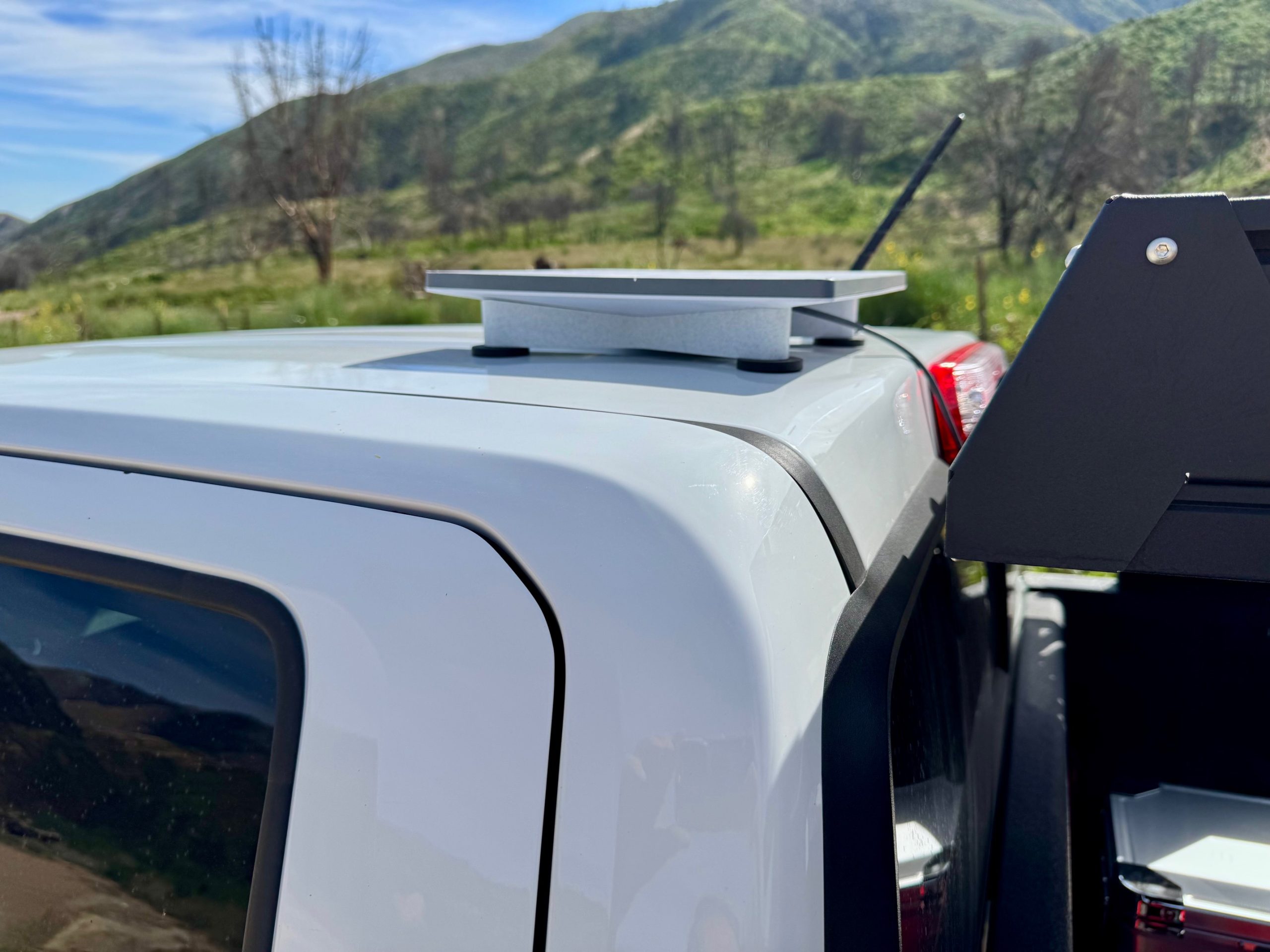
Elevation is the fix solving the most problems at once. Above all, raising the dish even a few feet changes the angle at which nearby branches intersect its field of view. This single adjustment often turns a 10% obstruction reading into something closer to 2%. For truck and van-based boondockers, roof mounting beats a ground tripod. It is the simplest way to gain this extra height without added gear.
I run the Flagpole Buddy Mini Starlink Flat Mount on my truck’s roof for exactly this reason. The magnetic version uses four 2.5-inch magnets delivering 100 lbs of combined holding force. Together, they hold the dish flat against the steel roof panel without drilling or a permanent bracket. Setup takes under two minutes. Place the mount, seat the Starlink Mini into the adapter, then route the power cord through the door seal to a cigarette lighter outlet. Because it stays magnetic rather than bolted, repositioning the whole setup takes seconds if the first spot at camp turns out to be obstructed. Curious how this mount performs on a grooved truck roof? Our full magnetic mount review covers the aerodynamic testing and highway-speed results in depth.
When You Need More Height Than a Roof Mount Provides
Dense old-growth stands sometimes swallow even a roof-mounted dish. In this situation, a taller option like Flagpole Buddy’s hitch-mounted pole kit for extra height helps. It raises the dish roughly 13 feet above a standard 2-inch receiver. This clears low canopy a roof mount cannot avoid. Field testing across Big Bear and other wooded basecamps found this kit held steady in sustained winds above 50 mph. This matters once you gain altitude at an exposed site.
Finding Clearings and Repositioning Fast
Elevation solves part of the equation, but placement inside the site still matters. Scout for natural clearings, meadow edges, or the side of camp facing the most open sky before setting up. Since the magnetic mount detaches in seconds, testing two or three spots before committing to firewood and camp chairs costs almost nothing.
Advanced mapping tools and satellite imagery apps help preview canopy density before you even arrive at a dispersed site. This narrows your search to locations more likely to deliver a clear path. Once on site, however, the Starlink App’s live obstruction reading is more reliable than any map. It accounts for the exact angle and season-specific foliage density in front of you right now.
Staying Connected for Remote Work at Camp

The same placement habits carry over once the workday starts. Tree cover matters most when a dropped connection means a missed deadline instead of a paused movie. For boondockers working remotely from camp, a few extra minutes optimizing dish placement pays off. It shows up across every call and upload the workday brings. I treat obstruction checking as part of setting up camp itself, right alongside leveling the rig and building the fire ring.
Leave slack in the power cable when running it from an elevated mount. A taut cable under vibration wears faster and risks pulling the connector loose during a bumpy stretch of road. Facing the mount forward helps too. Where possible, tucking it behind a wind break also reduces the chance of debris strikes damaging the dish during transit between sites.
Roof Mount vs. Pole Mount: Which Fits Your Camp?
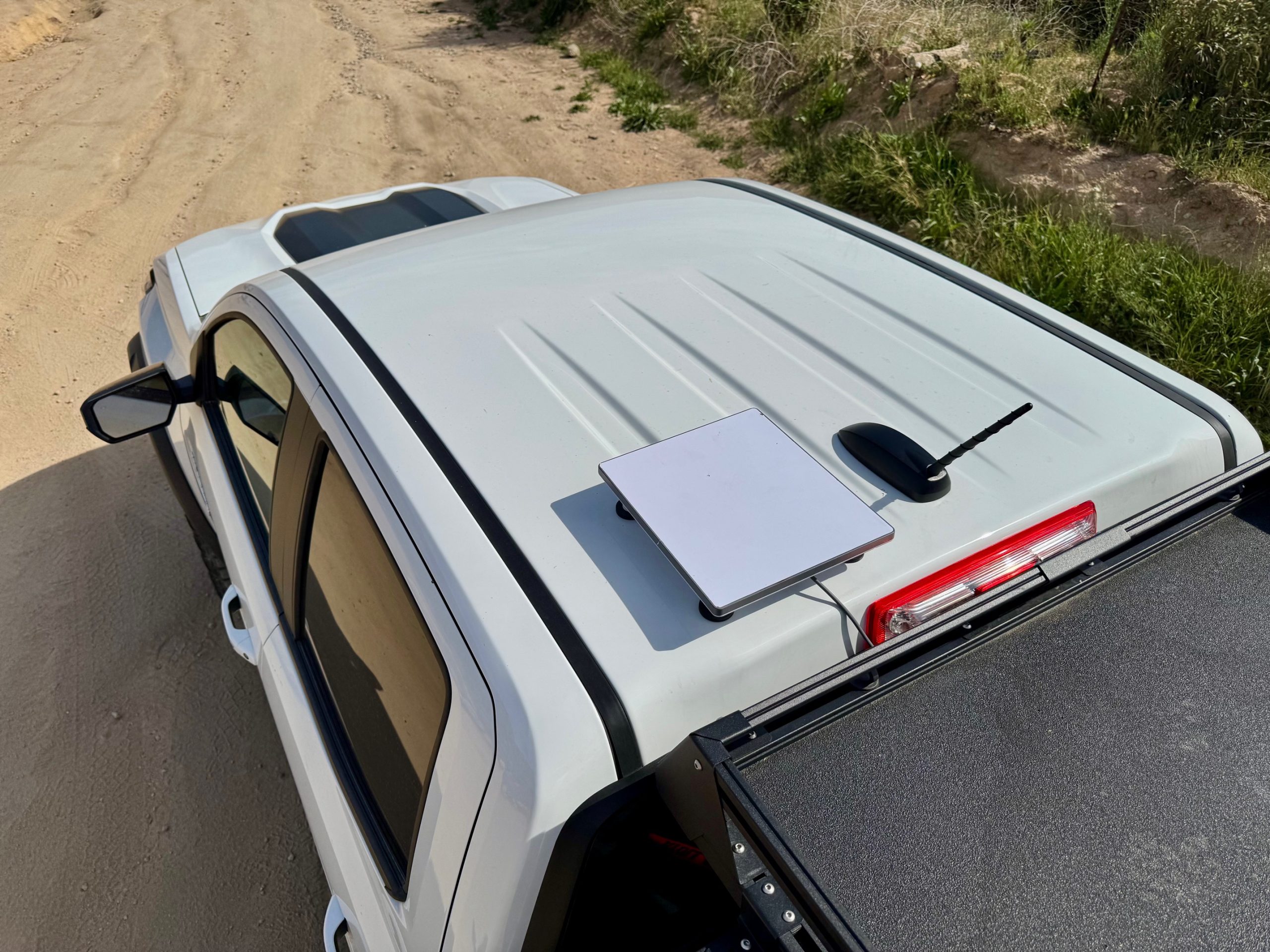
A magnetic roof mount fits the boondocker who moves camp often and wants a setup installed or removed in minutes. It solves the majority of tree cover situations by itself. A few feet of extra height combined with smart placement resolves most obstruction readings before they become a real problem.
A pole-based hitch mount fits the camper who returns to the same heavily wooded sites repeatedly. It also suits anyone needing guaranteed clearance regardless of where the truck happens to park. The extra height costs more upfront and takes longer to deploy. Still, it removes canopy from the equation entirely in situations a roof mount cannot solve alone. Want a broader look at complementary gear once your mount is sorted? Best Starlink Mini accessories for 2026 rounds up cases and cables worth adding to the kit.
Pros and Cons of Each Approach
Pros
- Magnetic roof mounts add height in under 2 minutes with no tools
- 100 lbs of magnetic holding force on the Flat Mount handles highway speeds
- Repositioning between test spots costs seconds, not a re-setup
- Pole kits add roughly 13 feet of clearance for dense canopy sites
- The Starlink App’s obstruction tool gives an exact, direction-by-direction reading
- Elevation alone often drops obstruction readings from double digits to under 3%
Cons
- Magnetic mounts require a steel roof panel, ruling out aluminum-bodied trucks
- Old-growth canopy still obstructs even a roof-height dish in the densest sites
- Pole kits take longer to deploy than a magnetic roof mount
- Obstruction readings shift throughout the day as satellites move lower
- Neither option clears a canyon or narrow draw with sky blocked on every side
Final Verdict

Boondockers dealing with tree cover get the most reliable results by treating dish placement as a daily habit rather than a one-time setup. Elevating the Starlink Mini with a roof mount, then confirming the spot with the app’s obstruction tool, solves the majority of dropout complaints reported across boondocking forums. It also matches what I have seen firsthand across several seasons of camping in the Wind Rivers and beyond.
The tradeoff: no mount fully overrides genuinely dense old-growth canopy or a site boxed in on every side. Campers who return to those conditions repeatedly are better served by a taller pole-based kit. It clears the treeline entirely, even though it takes longer to deploy than a magnetic mount.
For most boondockers moving between dispersed sites regularly, a magnetic roof mount helps most. Paired with a quick obstruction check at each new camp, it delivers dependable connectivity. It adds no real setup time to an already busy arrival routine. It is a small habit paying off consistently once the trees close in.
Do your typical sites run heavily wooded, where a few extra feet of clearance would solve the problem outright? If so, the hitch-mounted pole kit remains the stronger alternative worth comparing against the roof mount before you buy.
Ready to Buy?
Check Today’s Price on the Mini Starlink Flat Mount
Backed by a 2-year warranty and free domestic shipping direct from Flagpole Buddy.
Frequently Asked Questions
Does Starlink work in wooded campsites?
Yes, though performance depends heavily on canopy density and dish placement. For instance, light tree cover with an obstruction reading under roughly 2-3% typically supports normal streaming and browsing. Heavier canopy produces frequent short dropouts rather than a full outage, and elevating the dish above nearby branches usually improves the reading significantly.
How much tree cover will Starlink tolerate?
There is no fixed limit, since the relevant factor is the obstruction percentage reported by the Starlink App rather than the visible tree density. A site with scattered tall pines set back from camp often tests cleaner than a site with a single low branch hanging directly overhead.
How do I check for Starlink obstructions?
Open the Starlink App and use the Check for Obstructions tool. It scans 12 segments across each 30-degree slice of sky and flags any direction blocked by branches, terrain, or structures. Run this check at the exact height and spot where the dish will sit, since results change with elevation and position.
What is the best way to elevate a Starlink dish while camping?
A magnetic roof mount on a truck or van adds several feet of height in under two minutes without drilling or tools. Similarly, for sites with denser canopy, a hitch-mounted pole kit adds roughly 13 feet of additional clearance. This solves obstruction issues a roof mount alone cannot clear.
Why does my Starlink keep dropping in the woods?
Dropouts under tree cover usually trace back to branches intersecting the dish’s field of view from multiple angles as satellites move across the sky. The obstruction pattern shifts throughout the day. A spot testing clean in the morning often starts dropping connections by evening as more satellites sit lower on the horizon.
Is a Starlink Mini mountable on a vehicle?
Yes. Notably, the Starlink Mini weighs about 2.43 lbs and mounts easily on a vehicle roof using a magnetic, flush, or suction mount. A magnetic mount using four 2.5-inch magnets delivering 100 lbs of combined holding force secures the dish at highway speeds. It still allows quick removal or repositioning at each new campsite.
A quick heads-up: If you snag something through our affiliate links or check out our sponsored content, we might earn a commission at no extra cost to you. But fear not, we’re all about recommending stuff we’re truly stoked about!