



Quick Facts:
- Topic: Starlink Mini power consumption and off-grid setup
- Average draw: 20-40 W active, around 15 W idle
- Startup surge: up to 60 W for a few seconds
- Input: 110V AC or 12-48V DC, 60 W maximum
- USB-C PD: 100 W recommended, 65 W minimum
- Daily energy: roughly 480-960 Wh for 24/7 use
- Solar: a 100-200 W panel covers a full workday
- Best for: overlanders, vanlifers, and RVers running internet off-grid
8 min read
In This Guide
- Starlink Mini Power Consumption Overview
- Power Specs at a Glance
- How Many Watts Does the Starlink Mini Use?
- What Affects Starlink Mini Power Consumption
- How Long Will a Battery Run the Starlink Mini?
- Powering the Starlink Mini on 12V and DC
- Running the Starlink Mini on Solar
- Starlink Mini vs Standard Power Use
- Our Field-Tested Power Setup
- Final Verdict
- Frequently Asked Questions
Starlink Mini Power Consumption Overview
Starlink Mini power consumption sits far below older satellite dishes, which makes the Mini the top pick for overlanders, van builders, and RV travelers who run internet off a battery. According to Starlink, the dish pulls 20 to 40 watts during active use. At idle, draw drops to around 15 watts. These numbers shape every decision you make about batteries, solar panels, and wiring. This guide breaks down the real draw, runtime math, 12V wiring, and solar sizing. As a result, you size your power system once and stay online.
Off-grid travelers care about two questions: how many watts the dish needs, and how long a given battery keeps it running. We answer both with field-tested figures below. Because the Mini holds no internal battery, it draws power continuously from whatever source you connect. As a result, your power budget decides your uptime.
For context, the Mini uses roughly a quarter of the energy of a Standard Gen 3 dish. On most trips we leave plenty of headroom for a fridge, lights, and laptops while the Mini stays connected. Therefore it rarely dictates the size of your electrical system, even on a modest build.
Power Specs at a Glance
Before the runtime math, here are the core power figures pulled from Starlink’s official power guidance and confirmed in real-world use.
| Specification | Details |
|---|---|
| Average active draw | 20-40 W (Starlink official) |
| Idle draw | Around 15 W |
| Startup surge | Up to 60 W, brief |
| Real-world steady (clear sky) | Around 20-25 W |
| Maximum rated power | 60 W |
| Input voltage | 110V AC or 12-48V DC |
| USB-C PD requirement | 100 W (20V/5A) recommended, 65 W minimum |
| DC connector | 5.5 x 2.1 mm barrel jack |
| Daily energy, 8 hr use | Roughly 160-320 Wh |
| Daily energy, 24/7 use | Roughly 480-960 Wh |
| Internal battery | None, continuous power required |
How Many Watts Does the Starlink Mini Use?
Starlink Mini wattage shifts with use, weather, and signal quality. Starlink rates the dish at 20 to 40 watts on average, with idle draw near 15 watts and a brief startup surge toward 60 watts. In our testing on clear-sky days, steady draw often settles around 20 to 25 watts. Cold mornings and blocked horizons, however, push the figure higher.
The chart below shows how Starlink Mini wattage breaks down by scenario, from idle to the short startup spike.
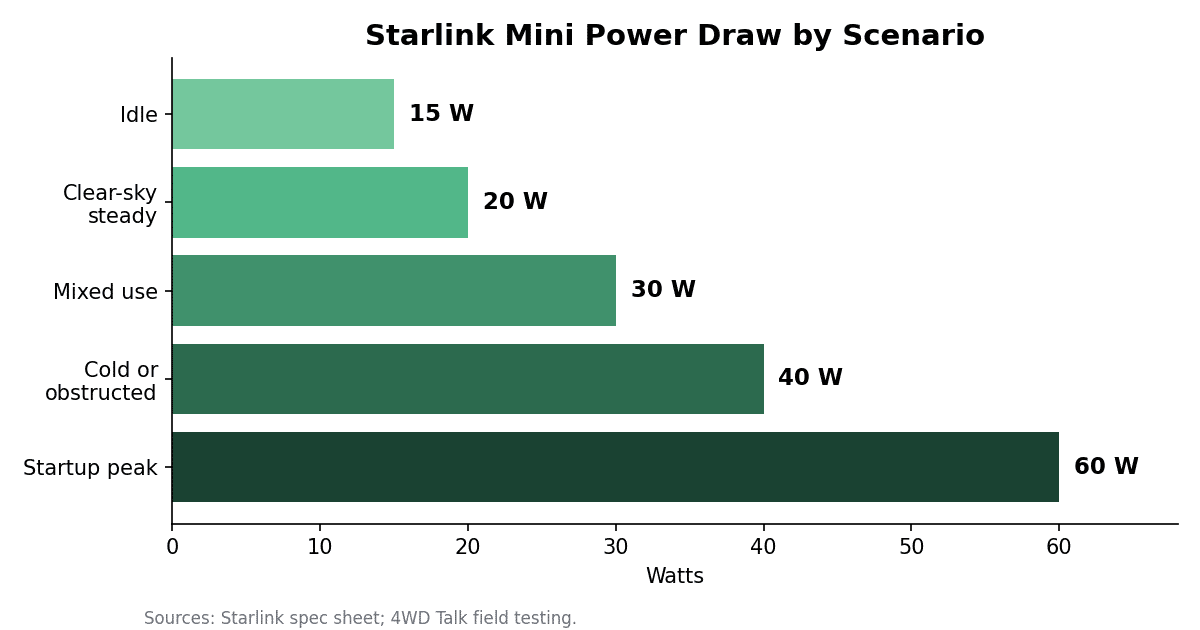
For planning, budget around 25 to 30 watts for mixed use. This figure leaves margin for streaming, video calls, and cold weather without leaving you offline at midday. Light browsing and email sit lower, while a 4K stream and a blocked sky view sit higher.
What Affects Starlink Mini Power Consumption
Four factors move Starlink Mini power consumption up or down. Knowing them helps you trim watts and stretch runtime.
Above all, obstructions are the biggest lever. When trees, rock walls, or a camper roof block part of the sky, the dish works harder to hold a connection. Therefore a clear 360-degree view lowers both power draw and dropouts. Even moving the Mini a few feet to clear a tree line helps.
Temperature matters next. Cold air raises draw, since the dish runs internal heating to stay within operating range. During winter trips, budget for the upper end of the wattage range. Warm conditions, by contrast, keep draw near the floor.
In addition, data volume has a smaller effect. Streaming video, large downloads, and video calls lift draw a few watts above idle browsing. Finally, watch Snow Melt mode in the Starlink app. It heats the dish for ice and snow, and it wastes power in mild weather. Switch it off when you travel through warm regions.
How Long Will a Battery Run the Starlink Mini?
Starlink Mini battery runtime comes down to one formula: watt-hours divided by watts. Take your battery capacity in watt-hours, then divide by your average draw. A 500 Wh power station at 25 watts gives you roughly 20 hours, before efficiency losses. Therefore your Starlink Mini battery sizing follows directly from this number.
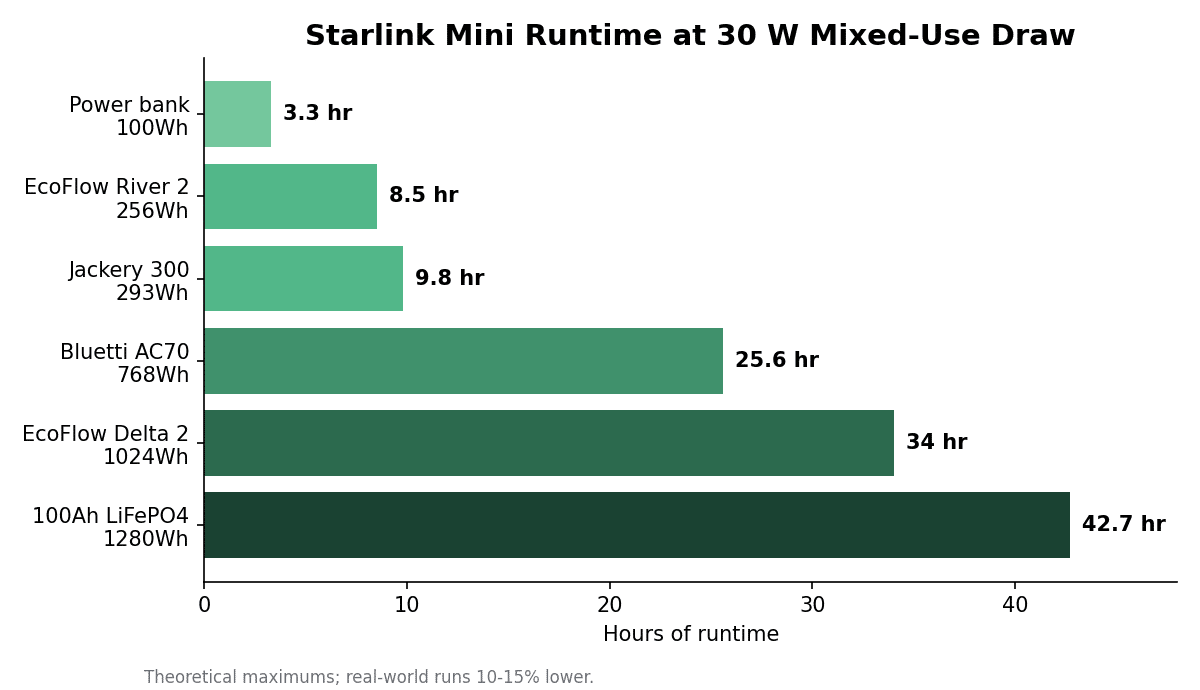
The table below lists common power sources at two planning figures: 20 watts for efficient clear-sky use and 30 watts for mixed use. Real-world runtime lands about 10 to 15 percent lower because of conversion and idle losses.
| Power source (capacity) | Runtime at 20 W | Runtime at 30 W |
|---|---|---|
| USB-C power bank (100 Wh) | ~5 hr | ~3.3 hr |
| EcoFlow River 2 (256 Wh) | ~12.8 hr | ~8.5 hr |
| Jackery Explorer 300 (293 Wh) | ~14.7 hr | ~9.8 hr |
| Bluetti AC70 (768 Wh) | ~38 hr | ~25.6 hr |
| EcoFlow Delta 2 (1,024 Wh) | ~51 hr | ~34 hr |
| 100Ah LiFePO4 (1,280 Wh) | ~64 hr | ~43 hr |
A mid-size power station clears a full day of use, while a 100Ah lithium bank runs the Mini most of a weekend.
Power tool batteries also work well for short sessions through an adapter. A 5.0Ah 18V pack (90 Wh) runs the Mini roughly 3 hours, an 8.0Ah pack (144 Wh) around 5 hours, and a 12.0Ah pack (216 Wh) near 7 hours. For all-day work, though, a power station or house battery beats swapping packs.
Powering the Starlink Mini on 12V and DC
Starlink Mini 12V setups run the dish straight from a vehicle or house battery, which skips the wall adapter entirely. The Mini accepts 12 to 48 volts DC through its 5.5 x 2.1 mm barrel jack. Therefore a direct DC cable is the most efficient path. If you power it over USB-C instead, use a 100 W (20V/5A) source. The dish will not start on USB-C profiles below 65 W, so skip phone chargers.
Skip the inverter whenever possible. An inverter forces two conversions: 12V up to 120V AC, then back down to DC through the wall adapter. Consequently, you lose 15 to 25 percent of your battery to double conversion. A direct DC cable runs one stage instead. Over a week-long trip, it stretches runtime by hours.
For a Starlink Mini 12V connection, voltage sag is the main risk. Lead-acid and AGM batteries dip toward 11.5 volts under load, which sits at the bottom of the dish’s range and triggers dropouts. A 12V-to-24V or 12V-to-30V step-up converter solves this by holding steady voltage. Lithium house batteries hold voltage better and often run the Mini directly. Either way, keep cable runs short. For long runs, use a heavier copper gauge. Also size your fuse for the brief 5 amp startup peak rather than the 1.7 amp steady draw. The Mini is sensitive to voltage loss, so favor quality copper over copper-clad wire.
Running the Starlink Mini on Solar
Solar pairs well with the Mini because daily energy is low. At 20 to 30 watts of average draw, a full 24 hours uses roughly 480 to 720 Wh. An 8-hour workday needs only 160 to 320 Wh. Those targets fall well within reach of a portable panel.
A 100 W panel in four to five peak-sun hours generates around 350 to 450 Wh, which covers a workday with margin. For continuous use and cloudy-day buffer, step up to a 200 W panel. We recommend charging a power station or house battery with the panel rather than wiring a panel straight to the dish. Sunlight fluctuates, so stored power keeps the connection stable through clouds and overnight.
A reliable off-grid kit looks like this: a 100Ah LiFePO4 battery, a 200 W solar panel, a charge controller, and a step-up converter to the Mini. In good sun, this combination runs the dish around the clock and recharges by mid-afternoon. For weekend trips, a 500 to 1,000 Wh solar generator with a folding panel does the same with no wiring.
Starlink Mini vs Standard Power Use
The biggest reason travelers choose the Mini is power. A Standard Gen 3 dish draws roughly 75 to 100 watts in active use, while the Mini draws 20 to 40 watts. As a result, the Mini consumes about a quarter to a third of the energy for similar everyday browsing, streaming, and calls.
| Dish | Active draw | Idle draw |
|---|---|---|
| Starlink Mini | 20-40 W | ~15 W |
| Standard (Gen 3) | 75-100 W | ~20 W |
Still, the Standard dish wins on raw speed and a wider antenna. For most off-grid rigs, though, the power saving outweighs the speed gap. A traveler on a modest battery bank keeps the Mini online all day, while the Standard would drain the same bank before dark.
Our Field-Tested Power Setup
On the trail, we power the Starlink Mini straight from a portable power station. Because the draw is low, it leaves room for everything else in camp. Our go-to is the EcoFlow Delta 2, and it has run our Mini for a full day of work across desert and mountain trips. At a 1,024 Wh capacity, it powers the dish well over a day while still topping off phones, drone batteries, and a 12V fridge. For a deeper look, see our EcoFlow Delta 2 Max one-year review.
If you are choosing a battery first, start with our roundup of the best portable power stations for overlanding. We size each one by real watt-hours, charge speed, and weight, which maps directly to the runtime table above. For mounting, cables, and cases to finish the build, our guide to the best Starlink Mini accessories covers the gear we trust after months on rough tracks.
Notably, a bigger battery lowers stress more than any setting tweak. Plan for a full day of use plus a safety margin, then recharge with solar or the vehicle alternator. If you also want help picking a data plan, read our breakdown of Starlink Roam plan pricing for the latest changes.
Final Verdict
For overlanders, vanlifers, and RV travelers, Starlink Mini power consumption is the standout feature for off-grid internet. At 20 to 40 watts active and 15 watts idle, the dish fits a modest battery bank with room to spare. Size your system around 25 to 30 watts for mixed use, and you stay online through cold mornings and busy work sessions.
The trade-offs are honest. Cold weather and obstructions raise draw, and a weak 12V source needs a step-up converter to avoid dropouts. Anyone wiring direct should respect the 5 amp startup peak and use quality copper. Those steps cost little and prevent the most common failures.
On value, a 500 to 1,000 Wh power station hits the sweet spot for most travelers. Notably, it covers a full day and recharges fast from solar. For full-time builds, a 100Ah lithium battery paired with a 200 W panel runs the Mini around the clock. We use the EcoFlow Delta 2 for exactly this reason. Moreover, it pairs cleanly with the accessories and panels we field-test on every trip.
Frequently Asked Questions
How much power does the Starlink Mini use?
Starlink rates the Mini at 20 to 40 watts during active use and around 15 watts at idle, with a brief startup surge near 60 watts. In clear-sky field use, steady draw often settles around 20 to 25 watts. Plan your battery around 25 to 30 watts for mixed use.
Will the Starlink Mini run on a 12V battery?
Yes. A Starlink Mini 12V setup runs the dish through a direct DC cable, since the Mini accepts 12 to 48 volts DC. On lead-acid or AGM batteries, add a 12V-to-24V step-up converter to prevent voltage sag dropouts. Lithium house batteries often run it directly.
How long will a power station run the Starlink Mini?
Divide watt-hours by watts. A 500 Wh station runs the Mini roughly 20 hours at 25 watts, while a 1,024 Wh EcoFlow Delta 2 runs it well over a day. Real-world runtime lands about 10 to 15 percent lower from conversion losses.
How much solar do you need to run the Starlink Mini?
A 100 W panel covers an 8-hour workday in good sun, generating around 350 to 450 Wh. For 24/7 use, pair a 200 W panel with a 100Ah lithium battery and a charge controller. Charge a battery with the panel rather than wiring solar straight to the dish.
Do you need an inverter for the Starlink Mini?
No, and skipping the inverter saves power. Running 12V through an inverter to 120V, then back to DC through the wall adapter, wastes 15 to 25 percent of your battery. A direct DC cable runs one conversion and stretches runtime.
Does cold weather raise Starlink Mini power consumption?
Yes. Cold air raises draw because the dish runs internal heating to stay in range. During winter trips, budget for the upper end of the wattage range. Turn off Snow Melt mode in mild weather to avoid wasting power.