


Quick Facts:
- Topic: Mini 2 campsite placement and the reported built-in battery.
- Main problem: Shaded vehicle parking versus a clear view of the sky.
- Reported change: A built-in battery, according to researcher Oleg Kutkov.
- Still unknown: Battery capacity, tested runtime, price and release date.
- Current alternative: The original Mini with a compatible external battery.
- Best for: Campers who move their dish away from the vehicle.
6 min read
In This Article
Mini 2 Campsite Setup: The Rumor Worth Watching
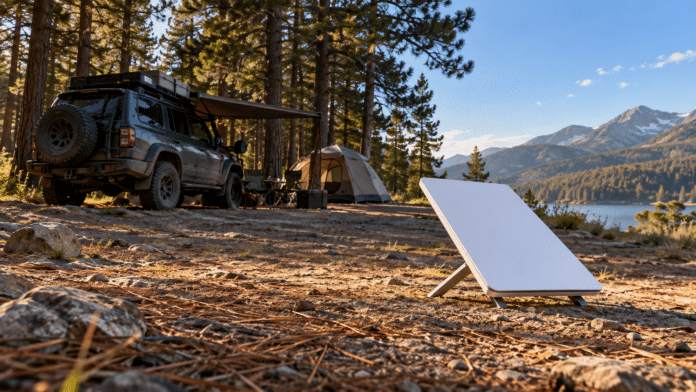
Every shaded campsite forces the same choice. Your truck belongs under the trees on a hot afternoon. Meanwhile, the dish needs open sky overhead. The power cable between them decides how far apart the two sit. A Starlink Mini 2 campsite setup with a built-in battery would loosen this tie.
Independent researcher Oleg Kutkov reported a built-in battery in the new terminal in July 2026. However, his report lists the battery capacity as unknown. Treat the camping benefit as a conditional use case, rather than a tested feature.
Our Starlink Mini 2 rumor coverage examines the wider hardware questions, including slower uploads. This article focuses on placement instead. For me, the useful part of this rumor is choosing the dish location separately from the parking spot.
| Key Fact | Evidence |
|---|---|
| Current Mini kit. | Built-in Wi-Fi and a 49.2 ft (15 m) power cable, per Starlink. |
| Mini 2 battery. | Reported from firmware; capacity unknown, no tested runtime. |
| Reported charging. | USB-C power delivery, per the same report. |
The current-kit details above come from Starlink’s Mini specifications. They describe today’s hardware, not the rumored replacement.
The Mini You Buy Today
If you need a dish this season, the current Starlink Mini kit below is the hardware you buy today. It ships with the cable and built-in Wi-Fi listed above, and it works with the external batteries covered later in this article.

STARLINK Mini Kit – Compact Dual-Band AC Wi-Fi Router and Satellite Dish System – High-Speed Portable Internet for Remote and Mobile Use – White
The hardware you buy today for shaded camps, with the router and power cable included.
- Wi-Fi router built into the dish
- 49.2 ft (15 m) power cable in the box
- Runs off compatible external batteries for cord-free placement
- No built-in battery, so cord-free use needs an external pack
- Wi-Fi reach drops through metal walls
Why a Good Campsite Makes a Poor Dish Location
Current Mini owners describe the shade-versus-sky conflict in practical terms. On irate4x4’s Starlink discussion, a camper-van owner wants to move a roof-mounted Mini away from trees. A longer power cable was the planned solution. The Mini 2 battery report points to another option.
Similarly, a Reddit camping discussion describes an owner parking an RV in shade. Then the Mini and a power bank ride on a Jeep in the nearest clearing for email and maps. Other owners in the thread report usable service with less repositioning, especially for light browsing.
These accounts describe different sites, but they show why Starlink Mini camping involves more than choosing a roof mount. Owners keep repeating one placement rule: put the dish between the trees, not under them.
Think of your camp as 2 locations: where you sit and where the terminal sees the sky. A battery addresses the power connection between them. Still, it does not change the surrounding canopy.
Mini 2 Campsite Setup: Placement Versus Runtime
If the reported design reaches buyers, moving the dish would no longer require moving a separate power source with it. For example, you would carry the terminal to a clearing while the vehicle stays in the shade.
However, a self-contained terminal still needs energy for the whole session. Kutkov’s report provides no battery capacity. Therefore, nobody knows yet whether the pack covers a workday, an evening of streaming or an overnight connection.
A built-in pack also needs a charging plan. If it runs low, you face the same decision current owners face: recharge the dish near your vehicle or bring power to its spot. Our Starlink Mini power consumption guide covers the wattage math behind those choices.
Until you see verified specifications and field tests, judge any Mini 2 campsite plan by the job you need done. A brief check-in and several hours of remote work place different demands on the same battery.
The Mini Still Needs Clear Sky and a Wi-Fi Link
Battery power does not solve a blocked satellite path. Starlink’s obstruction guidance names branches, poles and roofs as sources of service interruptions. First, check the proposed dish spot with the app’s obstruction tool.
Next, check the connection from your actual seat inside the truck, trailer or tent. The current Mini builds its router into the terminal. As a result, moving the dish also moves your Wi-Fi source.
Starlink Wi-Fi range is a separate question from satellite reception. Owners report better reach into fiberglass campers than through metal trailer walls or steel buildings. Some add a separate router or mesh unit closer to camp for this reason.
Raising the dish helps too. One way to lift it above brush near the vehicle appears in our Flagpole Buddy hitch mount review. In short, a Mini 2 campsite setup still needs the satellite link at the dish and a working device connection where you sit.
Your Current Mini Already Has a Workaround
You don’t need to wait for the Mini 2 to get cord-free placement. Portable power already separates today’s Mini from a vehicle outlet. Owners clip on power banks, Mini-specific battery packs and adapters for Milwaukee or Ryobi tool batteries. Consequently, the Mini 2 report describes a simpler package, rather than the first cord-free campsite option.
I ran my current Mini off a Star-Batt Plus at a Big Bear camp, with the dish on the ground and a clear view of the sky. It ran 27 hours and 27 minutes on one charge, with 8.3 percent left when I shut it off. Our Star-Batt Plus first impressions cover the details. However, one weekend with one pack says nothing about Mini 2 runtime or future accessory fit.
Owners also report the downside: carry-on-size power banks last only a few hours. In addition, a separate battery adds another item to carry and recharge. For more detail on Starlink Mini placement choices, see our tree-cover connection guide.
If you want cord-free Starlink Mini placement now, the battery packs below are built for the current dish. Check the pack’s output against your Mini’s power needs, and plan to recharge it between sessions.
Batteries for today's Starlink Mini

PeakDo LinkPower Power Bank and Mount Compatible with Starlink Mini


What This Means for You
With a Mini 2 campsite setup, assess 3 things in order: sky visibility, your device connection, then power duration.
If your current roof placement already works, a built-in battery offers less immediate value. Meanwhile, if you routinely move your dish to a clearing, fewer power connections remove a real setup chore. Before upgrading, compare the future terminal’s tested runtime with your longest planned session.
Also, check Starlink Wi-Fi range from your normal work spot before settling into camp. Avoid buying fitted mounts or battery accessories for unreleased hardware without confirmed compatibility.
Final Thoughts
I like where this rumor points. Shade for the truck, open sky for the dish, and no cord tying them together. If the battery report proves accurate, a Mini 2 campsite setup would be easier to carry and arrange.
Still, easier placement does not promise service beneath dense branches or a connection from any distance. Runtime, charging and the Wi-Fi path decide whether your setup works. Until those answers arrive, solve today’s location problem with the gear you own.
My Star-Batt Plus run at Big Bear already showed cord-free power works with today’s Mini. For Starlink Mini camping, I will judge the Mini 2 by one test. Does it make the walk from shaded parking to clear sky easier? If it does, the upgrade is worth a look.
Mini 2 Camping FAQ
Does a battery solve Starlink tree obstructions?
No. A battery changes where you get power, while the satellite connection still needs a clear sky view. Moving the dish to an opening addresses placement; a battery alone does not remove branches.
Will the Mini 2 need a power cable at camp?
The reported battery suggests the dish would run without a cable for some period. Still, capacity is unknown, so plan on recharging the pack, reportedly over USB-C, between longer sessions.
How far from camp should a Starlink dish sit?
There is no universal distance. With today’s Mini on vehicle power, the 49.2 ft (15 m) cable sets the limit. First, find an acceptable sky view. Then test the connection from the place where you plan to use your phone or laptop, since metal walls cut Wi-Fi reach.
How long will the Mini 2 battery last?
Kutkov’s report lists capacity as unknown and provides no measured runtime. Therefore, do not plan a full session around battery-duration claims without verified specifications or field results.
Should I replace my current Mini for shaded camping?
Not yet. The Mini 2 has no confirmed price, release date or tested runtime. A suitable external battery and a clear location already give you cord-free placement. Then check both the satellite connection and Wi-Fi back at camp before committing to a spot.
Related Reading