




Quick Facts:
- Product: PeakDo LinkPower 2, a clip-on Starlink Mini battery
- Capacity: 99Wh / 27,500mAh, 21700 lithium cells
- Claimed runtime: 5+ hours
- My runtime: 4 to 5 hours, depending on load
- Weight: 667g / 1.47 lb
- Dimensions: 243 x 115 x 27mm
- Inputs: USB-C PD, DC barrel, magnetic DC
- Weather rating: IP65, per PeakDo
- Price: roughly $220, live pricing below
- Best for: overlanders running a Mini away from the rig
8 min read
In This Review
- Why a Starlink Mini Needs a Battery of Its Own
- PeakDo LinkPower 2 Specs at a Glance
- Real Starlink Mini Battery Runtime Across 60 Days
- Bypass Mode Is the Feature Worth Paying For
- The Shutdown Problem Owners Keep Reporting
- What 60 Days of Heat and Washboard Did to It
- The Bluetooth App Is the Weak Link
- LinkPower 2 vs LinkPower 1: Which Starlink Mini Battery Fits
- What Works and What Does Not
- Final Verdict
- Frequently Asked Questions
Why a Starlink Mini Needs a Battery of Its Own
A Starlink Mini battery solves one problem, and it is the problem most overlanders hit soon after buying the dish. SpaceX built the Mini around a barrel jack and a wall brick. Feed it from USB-C instead and you hit a hard floor. Starlink states the Mini will not work with USB PD ratings of 65W or lower. Instead it wants a 100W, 20V/5A source. Meanwhile a typical Starlink Mini power bank falls short of 100W.
The PeakDo LinkPower 2 sidesteps the whole argument. It slides into the same slot as the SpaceX tilt mount, then feeds the dish over a short DC cable at 15 to 21V. No wall brick, no 100W bank, no long cord across a campsite. I ran mine for 60 days across desert washes, alpine tree cover, and washboard.
This is not the biggest or cheapest option on the shelf. Our roundup of the best Starlink Mini battery picks sets it against a 576Wh LiFePO4 box. The LinkPower 2 competes on shape, not raw capacity. PeakDo had no input on anything below.
PeakDo LinkPower 2 Specs at a Glance
| Specification | Details |
|---|---|
| Capacity | 99Wh / 27,500mAh, 21700 lithium cells |
| Claimed runtime | 5+ hours on a Starlink Mini |
| DC output | 15 to 21V, 65W max |
| USB-C PD | 65W in and out, 100W input via software |
| Charge inputs | USB-C, DC barrel, magnetic breakaway DC |
| Size and weight | 243 x 115 x 27mm, 667g / 1.47 lb |
| Screen and control | 1.47-inch LCD, Bluetooth web app |
| Mount thread | 1/4-20 tripod socket, per PeakDo |
| Weather and temp | IP65 claimed, minus 20C to plus 60C |

Starlink Mini Battery Pack 99Wh, Portable Power Supply, 3 Charging Options | with USB-C, DC & Magnetic DC Input, USB-C Output, Bypass Charging, Up to 5H Runtime, Carrying Case for RV Camping & Off-Grid
Designed for Starlink Mini – Compact All-in-One Power Solution with Carrying Bag: Built as one of the essential Starlink Mini accessories, this compact Starlink Mini battery pack integrates seamlessly with your device to create a streamlined, travel-ready Starlink Mini power supply. The integrated design eliminates bulky external power stations and messy cables, while the included carrying bag makes storage and transportation more convenient. Ideal for camping, RV trips, travel, and outdoor work
- Clips into the dish mount, so the whole kit moves as one piece
- Bypass mode powers the dish directly and spares the cells
- DC barrel output skips the 100W USB-C PD requirement
- 99Wh keeps it under the IATA carry-on limit for fly-and-drive trips
- Some second-generation units fail to cut DC output at shutdown, so verify yours on day one
- No native app, so iPhone owners need a third-party Bluetooth browser
Two numbers matter more than the rest. First, 99Wh sits one watt-hour under the IATA carry-on ceiling, so the pack flies with you. Second, the DC barrel output bypasses the 100W USB-C PD requirement entirely.
Real Starlink Mini Battery Runtime Across 60 Days
What Your Load Costs in Watts
Runtime arguments online go nowhere because nobody states the load. Start with Starlink Mini power consumption, because it is the whole equation. Starlink rates the Mini at 20 to 40W in active use and about 15W idle, and our own testing on Starlink Mini power consumption confirms the range. Owners running inline meters land in the same place. One logged about 17W sitting idle, near 25W during normal browsing, and up to 44W while streaming video.
Nameplate capacity flatters the math, though. After conversion losses you work with roughly 79Wh of the 99Wh on the label. At 17W idle the same owner logged four hours and thirty-nine minutes. A working day near 25W fell to three hours and ten minutes. Streaming at 44W emptied the pack in one hour and forty-eight minutes. PeakDo advertises 5+ hours, and owners read the number as an idle figure rather than a working one. The Verge measured five hours and thirty minutes with the dish averaging about 18W in its own test.
Where My Numbers Landed
Across 60 days I logged 4 to 5 hours per full charge, and other owners report the same spread. Light camp use pushed me toward the top of the range. Two laptops plus a family hotspot on a working afternoon dropped me near the three-hour figure above. Cold mornings cost me more, though I never ran a controlled sub-freezing test. So treat my cold-weather number as an impression until someone tests it properly.
Tree cover changes the equation too, since a dish hunting for sky draws more. If you camp in timber, read our notes on keeping Starlink connected in trees before blaming the pack.
Bypass Mode Is the Feature Worth Paying For
Bypass is the reason I stopped taking the battery off the dish. With external power plugged in, the LinkPower 2 feeds the Mini straight through and leaves the cells alone. Heat drops, cycle wear drops, and the pack stops acting like a middleman. When the source dies, the battery picks up without dropping the link.
The practical win shows up on travel days. A 28W USB-C jack in the dash outpaces an 18W dish, so the pack gains charge instead of losing it. Solar works the same way, and The Verge stretched a session past seven hours on a 7.3W panel. One warning, though: input only holds the line once it exceeds the dish’s live draw. Below the draw you slow the drain instead of stopping it. One owner called pass-through useless for exactly this reason, while another disagreed.
The Shutdown Problem Owners Keep Reporting
One complaint outranks the rest, and nobody selling this pack mentions it. Owners in separate threads report second-generation units failing to cut DC output on shutdown. The LCD reads off. Your app agrees. Yet the dish keeps broadcasting Wi-Fi and keeps heating up. One owner called the units borderline dangerous after packing a live dish into a case.
Safety note: Before a Mini goes into a padded case, confirm the dish is dark. Then check for its Wi-Fi network on your phone. A screen reading off is not proof. Heat with nowhere to go ruins a lithium pack and a $199 dish together.
My own unit behaved. Shutdown worked, the SSID vanished, and nothing cooked in a case. So the fault is not universal. Still, the pattern repeats across unrelated owners. One went through two units and had a third in hand when he posted. Another emailed PeakDo, received a replacement with updated software, and reported normal behavior since. Set against those reports, one owner says his units failed even after a firmware update.
Two things follow. Buy where returns are painless, and verify shutdown behavior on day one, before the return window closes. Heat matters for a second reason, and this one PeakDo built for.
What 60 Days of Heat and Washboard Did to It
PeakDo claims IP65 and a metal heat sink. Both held up for me through summer heat and a few real downpours, although the owner record on heat is split. Some report thermal cutbacks while charging and powering at once, and others report no trouble at 85F. The Verge listed the first-generation pack as IPX4 a year earlier, while PeakDo now claims IP65 across the line. The rating also stops applying once a charging cable opens a port, and no IP rating covers a roof rack at highway speed.
Washboard is the other test. Although the pack locks into the dish firmly, I would not trust the clip alone on a moving roof. The Verge’s reviewer screwed a magnet into the tripod socket for exactly this reason. Check your thread before buying accessories, because one owner measured M6x1.0 with a gauge instead of 1/4-20, and others report threads which simply do not fit.
Storage deserves a word as well. One LinkPower 1 owner charged to full, shut down, then found the pack near half empty two weeks later. Nobody has confirmed the same fault on the LinkPower 2, so top it off before a trip.
Plan for higher draw from newer dishes too. The larger V5 pulls 35 to 50W, and our look at what Starlink V5 changes explains the impact on any pack you buy now.
The Bluetooth App Is the Weak Link
Good hardware, weak software. Checking a roof-mounted pack from the driver’s seat saves a ladder trip, and the scheduling timer powers the dish down overnight on its own. Usefully, the pack doubles as an ordinary Starlink Mini power bank for a phone or a laptop over USB-C.
There is no native app. Android users load a web app. Worse, iPhone users install a third-party Bluetooth browser first, a strange ask for a $220 accessory. The Verge called the app janky in two reviews a year apart, and the description fits. Owners now pay for unofficial companion apps, and the resentment in those threads is loud. So the question becomes whether the newer pack earns its price.
LinkPower 2 vs LinkPower 1: Which Starlink Mini Battery Fits
Every difference sits at the edges. Both packs hold the same 99Wh in the same 27mm shell at nearly the same weight. The LinkPower 2 adds a DC barrel input matching the Starlink adapter, a magnetic breakaway dongle, and bypass mode. It also gains a fuller metal heat sink and about an hour of runtime.
Whether those edges justify roughly $60 depends on how you charge. Neither model is automatically the best battery for Starlink Mini duty. If a wall brick is your only source, the original pack does the job, and The Verge recommends it for exactly this reason. However, if you charge from a vehicle jack, a solar panel, or the Starlink brick while the dish runs, bypass and the DC input change your day. For a bigger jump in capacity, our Star-Batt Plus runtime test covers the all-day class.
| Top Pick | Best for Wall Charging | |
|---|---|---|
| Product | TOP PICKPeakDo LinkPower 2 | 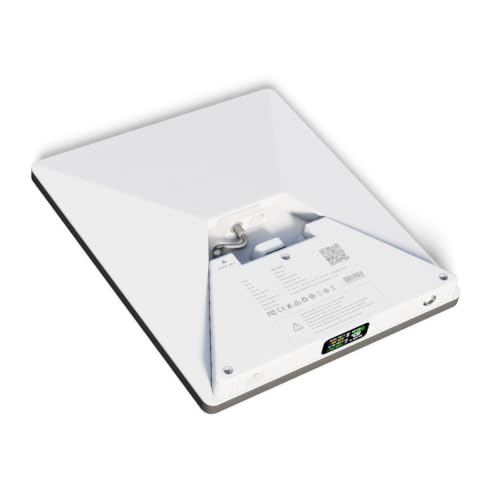 PeakDo LinkPower 1 |
| Rating | ★★★★☆ 4.0 15 ratings | ★★★★☆ 4.0 333 ratings |
| Capacity | 99Wh | 99Wh |
| Runtime on a Starlink Mini | 4 to 5 hours tested | About an hour less |
| Charge Inputs | USB-C, DC barrel, magnetic DC, plus bypass mode | USB-C only, no bypass mode |
| Price | $215.10 as of Nov 20, 5:44 pm | $143.65 as of Nov 20, 5:44 pm |
| Check Price → | Check Price → |
What Works and What Does Not
Pros
- Clips into the dish mount, so the whole kit moves as one piece
- Delivers 4 to 5 hours of runtime, matching what other owners log
- Bypass mode powers the dish directly and spares the cells
- DC barrel output skips the 100W USB-PD requirement
- 99Wh keeps it under the IATA carry-on limit for fly-and-drive trips
- Magnetic breakaway dongle saves a snagged dish from a fall
- LCD plus Bluetooth shows charge state without a ladder
Cons
- Shutdown failures on some second-generation units leave the dish live and hot
- Roughly $220 for 99Wh, nearly double the first-generation launch price
- No native app, and iPhone owners need a third-party browser
- Still no built-in kickstand, and the pack blocks the SpaceX mount
Final Verdict
I keep the LinkPower 2 on my dish, and after 60 days I would buy it again. Its strength is the shape. One object goes on the roof, one object comes off, and my camp stops looking like a cable yard. For overlanders who move the dish every day, it saves a setup and teardown twice daily.
The trade-offs are real, though. You pay roughly $220 for 99Wh while a plain pack of the same size costs half as much. Because of the shutdown reports, you must verify your unit rather than trust it. If your dish lives bolted to a rack and never moves, skip this category. Instead, spend the money on capacity.
The premium buys a form factor and an input set, not watt-hours. Judge it against a mount and a cable kit, not a cheap brick. Set beside a Starlink monthly cost breakdown, the premium reads smaller.
Move your dish daily and the LinkPower 2 is the best battery for Starlink Mini duty. The case gets stronger when you charge from a vehicle jack or a panel. Charge only at a wall outlet? Save the $60 and buy the LinkPower 1. Base camp crews who need all-day uptime should skip both for a 500Wh-class box.
Frequently Asked Questions
How long does a Starlink Mini battery last?
A 99Wh pack like this one runs a Starlink Mini for 4 to 5 hours in normal use. Idle, one owner logged four hours and thirty-nine minutes, while The Verge reached five hours and thirty minutes at about 18W. Stream video and you drop under two hours. Load decides the answer, not the badge on the box.
How much power does the Starlink Mini use?
Starlink rates the Mini at 20 to 40W in active use and about 15W idle, and owner meters peak near 44W while streaming. The larger V5 dish draws 35 to 50W. Starlink Mini power consumption drives every runtime estimate here.
Does the LinkPower 2 charge a Starlink Mini from solar?
Yes. Feed a folding panel into the USB-C input and the pack charges while it powers the dish. The Verge stretched a session past seven hours on a 7.3W panel. Input only holds the charge level once it exceeds the dish’s live draw.
Is a 99Wh Starlink Mini battery allowed on a plane?
Yes, and the capacity is deliberate. FAA and IATA rules cap spare lithium batteries in carry-on at 100Wh without airline approval. Therefore a 99Wh pack clears the bar while a 158Wh Ravion pack does not.
Should you buy the LinkPower 1 or the LinkPower 2?
Buy the LinkPower 2 for bypass mode, the DC barrel input, and the breakaway dongle. Stick with the cheaper LinkPower 1 if a wall charger is your only source, because the extra hour alone rarely justifies the difference.