


Quick Facts:
- Starlink Mini hardware: from $199, plus a $55 to $175 monthly plan
- WeBoost booster: $549.99, one-time purchase, no subscription
- Starlink Mini weight: 2.43 lbs dish, 6 lbs full kit
- WeBoost power draw: 12V at 1.8A, far below Starlink Mini’s 25 to 40 watts
- What Starlink Mini does: builds its own satellite connection under open sky
- What a cell booster does: amplifies a weak signal already reaching you
- Best for: overlanders deciding which connectivity gear their rig needs
10 min read
In This Guide
- Overview: Two Different Problems
- WeBoost vs Starlink Mini: Full Comparison Table
- How Starlink Mini Works for Overlanding
- How a WeBoost Cell Booster Works
- Cost: One-Time Purchase vs Monthly Subscription
- Power Draw: Starlink Mini vs a WeBoost
- Installation and Mounting on a Rig
- Where Each One Fails
- WeBoost vs Starlink Mini: Which Wins Where
- Final Verdict
- FAQ
Overview: Two Different Problems
WeBoost vs Starlink is the debate every overlander eventually has. A cell booster amplifies a signal already near you. Starlink Mini builds its own satellite connection instead. It works even where no cell tower reaches. Confusing the two costs money or leaves you offline. The Starlink vs cell booster question comes down to coverage, not price.
Most overlanders start with a booster, since it costs less and installs fast. A WeBoost has long solved the weak-signal problem on forest roads and BLM land. Starlink Mini changed the equation for trips beyond any cell network. A booster with nothing to boost sits dead in the dash. This guide compares both, so you know when you need one, the other, or both.
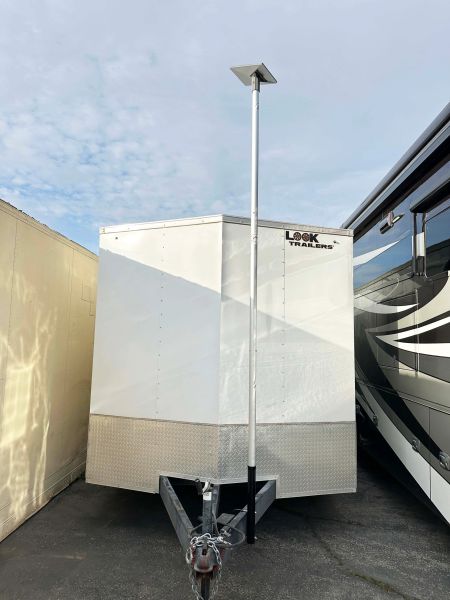
Mount Your Starlink Mini: FlagPole Buddy Options
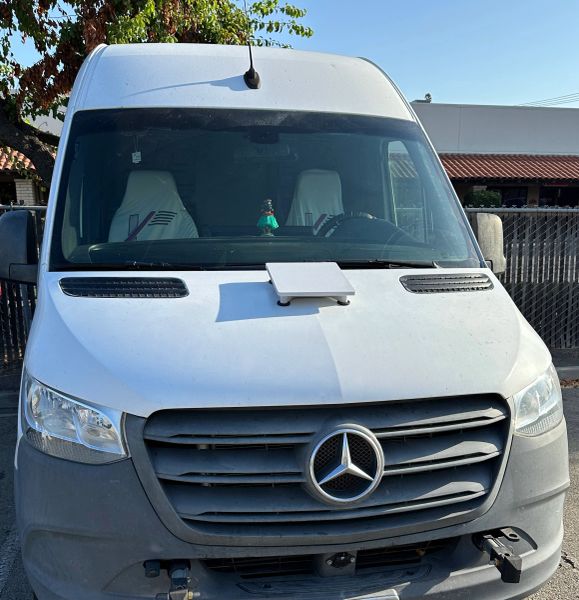
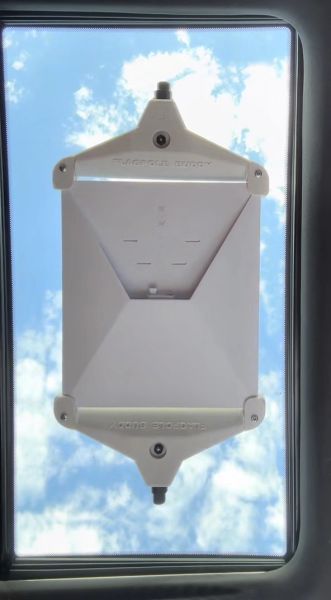
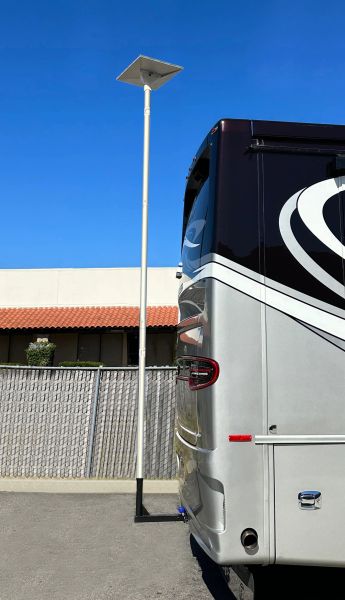

Starlink for overlanding only makes sense once cell coverage disappears completely. Camp within range of a nearby town, and a booster alone keeps calls and texts working. Cross into terrain with zero towers, such as much of the Mojave or long stretches of the Alaska Highway, and Starlink Mini becomes the gear keeping you online there. The sections below compare price, weight, power draw, and setup time to match gear with your travel pattern.
WeBoost vs Starlink Mini: Full Comparison Table
Specs alone will not settle the decision, but they narrow it fast. The table below lines up Starlink Mini against two common overlanding cell boosters: WeBoost’s Drive Reach Overland and the SureCall Fusion2Go XR OTR.
| Spec | Starlink Mini | WeBoost Drive Reach Overland | SureCall Fusion2Go XR OTR |
|---|---|---|---|
| Hardware price | From $199 | $549.99 | $599.99 |
| Ongoing cost | $55 to $175 a month | None | None |
| Weight | 2.43 lbs dish, 6 lbs full kit | 1.8 lbs booster unit | Under 2 lbs booster unit |
| Power draw | 25 to 40 watts average | 12V at 1.8A, about 22 watts | 12V DC power cord |
| Install time | Typically under 15 minutes with a mount | 30 to 45 minutes | Comparable to the WeBoost, no exact time published |
| Works while driving | Yes, on Roam plans in select areas | Yes, boosts signal in motion | Yes, boosts signal in motion |
| Needs an existing signal | No, works under open sky alone | Yes, amplifies a signal already present | Yes, amplifies a signal already present |
| Warranty | 12-month limited hardware warranty | 2 years, 30-day money-back guarantee | 3 years |
| Best for | No-signal terrain, remote work, long off-grid stays | Weak-but-present signal, calls and texts, tight budgets | Weak-but-present signal, multi-antenna installs |
| Year 1 total cost | About $859 (cheapest plan) | $549.99 flat | $599.99 flat |
| Year 2 total cost | About $1,519 (cheapest plan) | $549.99 flat | $599.99 flat |
Quick read: if trips stay within reach of a cell tower, start with a WeBoost. If routes regularly lose all signal, Starlink Mini is the gear keeping a rig online.
Three numbers stand out right away. A WeBoost costs more upfront but nothing after. Starlink Mini costs less upfront but adds a recurring bill. Notably, only Starlink Mini works with zero existing cell signal.
How Starlink Mini Works for Overlanding
The table above sets the numbers. This section, and the ones after it, explain why those numbers play out the way they do on an actual rig. Starlink Mini talks directly to a fleet of low-earth-orbit satellites. Instead of relying on a tower, it builds its own link to space. The dish weighs 2.43 lbs and folds into a kit weighing about 6 lbs with cables and a kickstand included. It’s also light enough to travel loose in a truck bed toolbox, or mount semi-permanently on a roof rack using a tested Starlink Mini magnetic mount.
Setup moves quickly, since a built-in WiFi router skips the separate router box older Starlink kits required. First, point the dish at open sky and plug it into 12- to 48-volt DC or a USB-C power bank. Then the app walks you through alignment in under 10 minutes. Coverage runs roughly 1,200 square feet, enough for a truck camper or small trailer without a booster of its own.
The tradeoff shows up in power draw and price. Starlink Mini pulls 25 to 40 watts on average, more than most 12V accessories on a rig, and the cheapest Roam plan starts at $55 a month for 100GB. For overlanders spending weeks off-grid every year, this often beats what a string of campground WiFi day passes would cost. For weekend trips within cell range, though, it’s a bill for a problem the rig does not have.
How a WeBoost Cell Booster Works
Where Starlink Mini builds a new connection, a booster works with what’s already there. It does not create a new connection. Instead, it pulls in whatever signal reaches an antenna, amplifies it by up to 50 dB (the FCC maximum allowed for consumer boosters), and rebroadcasts it inside the cab or camper. If a phone shows zero bars, a booster has nothing to work with and stays silent. Notably, this single fact separates it from Starlink Mini more than any spec sheet does.
WeBoost’s own Drive Reach Overland fits this exact use case. It runs $549.99 and mounts with a folding bracket rated for T-slot, pole, or fixed installs. WeBoost claims up to 32 times stronger signal, with dropped calls cut by as much as 90 percent. Installation takes 30 to 45 minutes, longer than installing Starlink Mini, mostly because routing the antenna cable through a firewall or roof takes more planning than pointing a dish skyward. Overlanders searching for the best cell phone booster for rural areas usually land on WeBoost or SureCall, both proven on forest service roads.
From experience: I ran a WeBoost cell booster for years, like many overlanders do, and it was great for what it was. It’s a solid, no-subscription way to pull in more signal where some signal already exists. It was never going to solve the problem Starlink Mini solves, since a booster only works with a signal already there to amplify.
A booster buys a stronger version of whatever signal already exists nearby. Still, it cannot manufacture coverage where none exists. No amount of antenna gain changes this fact.
Cost: One-Time Purchase vs Monthly Subscription
Understanding how each device works explains half the decision. Money is the other half, and it’s where the two diverge hardest. A WeBoost Drive Reach Overland costs $549.99 once, with no subscription required. Starlink Mini hardware starts at $199 in select areas. However, running it requires a Roam plan: $55 a month for 100GB, $80 for 300GB, or $175 for unlimited high-speed data. 4wdTalk’s Starlink monthly cost breakdown covers every plan tier in detail.
Run the math over a year and the picture gets clearer. At the cheapest $55 plan, Starlink Mini adds up to $199 plus $660 in the first year, about $859 total, well past the WeBoost’s one-time $549.99 price. By year two, the WeBoost has already paid for itself against nearly any Starlink plan, because it never adds a monthly charge. Framed as Starlink vs cell booster, the math favors Starlink Mini only when a rig genuinely needs internet where no cell signal reaches.
Overlanders working remotely, running a camera crew, or spending months off-grid usually justify the subscription. Weekend or week-long trips staying within range of a nearby town rarely do. Connectivity gear is a small slice of most overland budgets, but it’s one of the few line items charging long after the purchase closes.
Power Draw: Starlink Mini vs a WeBoost
Cost is not the only recurring line item. Electrical load matters equally on a rig running lights, a fridge, and a fan off the same battery bank. Starlink Mini’s official spec sheet lists 25 to 40 watts average power draw. Field reports from overlanders put idle draw around 15 watts, with brief spikes toward 70 watts during heavy uploads. A WeBoost pulls about 22 watts total at 12V and 1.8A, and holds steady there, because it has no processor tracking satellites overhead. Over a 10-hour day, Starlink Mini pulls roughly 250 to 400 watt-hours, a real bite out of a 100Ah lithium bank running other gear too. 4wdTalk’s Starlink Mini power consumption breakdown walks through real watt and runtime numbers.
WeBoost vs Starlink also splits hard on power draw, beyond price alone. Compared to Starlink Mini, a WeBoost’s draw amounts to a rounding error on most 12V electrical systems. Starlink Mini does not, and running it continuously off-grid usually means adding solar capacity or accepting shorter runtime between charges.
Installation and Mounting on a Rig
Starlink Mini sets up fast, since it ships with a kickstand and needs no cabling beyond a single power line. Most overlanders skip the kickstand entirely and use a roof-rack flat mount or a hitch-mounted pole instead. This keeps the dish clear of tree branches and level on uneven ground. 4wdTalk’s roundup of the best Starlink Mini accessories covers mounts, cases, and power cables worth adding to the kit.

weBoost Drive Reach Overland - Cell Phone Signal Booster for Off-Road Vehicles, Boosts 5G & 4G LTE for All U.S. Carriers, Made in USA
The exact booster this comparison tests, built for off-road rigs with an external antenna and in-motion use.
- Boosts 5G and 4G LTE on every US carrier
- Works while driving with no setup stop
- One-time purchase, no monthly subscription
- Made in the USA and FCC approved
- Amplifies a weak signal, it cannot create one from nothing
A WeBoost takes longer, typically 30 to 45 minutes. The exterior antenna needs a clear line to the cab-mounted interior antenna. Routing also means running a cable through a firewall or window boot. The Drive Reach Overland’s folding bracket fits T-slot rails and pole mounts common on overland roof racks, and it carries a MIL-STD-810H vibration rating and IP66 weatherproofing, specs built for trail use instead of a driveway install.
Neither install requires a professional, but a WeBoost asks more patience for cable routing on a first attempt. Starlink Mini asks for a bigger mounting budget if the goal is a permanent fixture instead of a setup-and-breakdown routine at every camp.
Where Each One Fails
Mounting solves how a device stays in place. It does not solve where a signal reaches, and this is where both devices hit real limits. Starlink Mini needs a clear view of open sky. Dense tree cover, canyon walls, or parking under an awning blocks the signal. 4wdTalk’s guide to keeping Starlink connected under tree cover covers workarounds like pole-mounting above the canopy. In a slot canyon or dense forest campsite, a cell booster with zero underlying signal fails alongside it, because there’s nothing left to amplify either.
In contrast, a WeBoost fails differently. It fails once a rig sits too far from any tower, regardless of antenna gain or mounting height. Rural stretches of Nevada, the Alaska Highway, and large sections of Southwest BLM land often carry no cell coverage at all. There’s nothing there for a booster to amplify, at any price. Starlink Mini exists to solve exactly this scenario. It’s the one gap a booster cannot close, no matter how good the hardware is.
WeBoost vs Starlink Mini: Which Wins Where
The honest answer depends on where a rig travels, not which product is marketed harder. Trips staying within reach of a cell tower, even a weak one, favor a WeBoost: less money, no ongoing bill. Routes crossing terrain with no coverage leave a booster useless. There, Starlink Mini becomes the only gear keeping a rig connected.
Here’s a quick test: pull up the last three or four trips on the calendar. If any night landed more than a short drive from a town with zero phone bars, this trip made the case for Starlink Mini. If every night stayed within reach of at least a weak signal, a WeBoost covered it. WeBoost’s own marketing already frames the two as complementary rather than competing, and the trip-by-trip test above is a faster way to confirm it than reading spec sheets.
Final Verdict
First, buy a WeBoost on a tight budget if most trips stay within reasonable distance of cell towers. It costs $549.99 once and needs no subscription. It also turns a frustrating one-bar signal into something usable for calls, texts, and light browsing. For overlanders camping near National Forest access roads or BLM land within an hour of town, this covers the real problem most weekends bring.
Second, buy Starlink Mini if trips regularly put a rig somewhere with no cell signal at all. The same goes for remote work needing reliable bandwidth wherever the truck parks. The $55 to $175 monthly cost stings next to a one-time booster purchase. Still, it buys a capability a booster does not replicate at any price: a connection built from scratch, independent of any tower. Starlink for overlanding earns its monthly cost on exactly these trips.
Neither device replaces the other, because they solve different problems. Likewise, a booster with no signal to amplify is dead weight. A satellite dish parked under full tree canopy performs no better. Matching the tool to an actual travel pattern, instead of buying whichever one is trending, saves money either way.
The WeBoost vs Starlink choice, in the end, tracks your travel radius more than your budget. Overlanders splitting time between both scenarios often run a WeBoost for daily driving and pack Starlink Mini for deep-backcountry trips. 4wdTalk’s guide to where to spend on an overland setup helps place connectivity gear against everything else on a build list.
FAQ
How much does Starlink Mini cost per month for overlanding?
Starlink Mini runs on the Roam plan family, starting at $55 a month for 100GB of high-speed data, $80 a month for 300GB, or $175 a month for unlimited high-speed data. Hardware starts at $199 in select areas on top of the monthly plan.
Does Starlink Mini work while driving?
Yes, on Roam plans and in select coverage areas, Starlink Mini holds a connection while a vehicle moves. Earlier Starlink dishes were rated for stationary use only. Performance still depends on a clear view of open sky.
WeBoost vs Starlink: is it worth running both on the same rig?
For many overlanders, yes. A WeBoost handles daily driving near towns, while Starlink Mini takes over once a route drops out of cell range entirely. The two solve different problems instead of competing for the same job.
Does Starlink Mini need a separate router?
No. Starlink Mini includes a built-in WiFi router with dual-band coverage. This skips the separate router box older, larger Starlink kits required.
Is a WeBoost cell booster worth it if I already travel near cell towers?
Yes, for most overlanders whose routes stay within range of a cell tower, even a weak one. A WeBoost costs $549.99 once with no subscription, and it turns a marginal signal into a usable one. Among options for the best cell phone booster for rural areas, it remains a top pick for calls, texts, and light browsing.
How long does a WeBoost installation take?
Installing a WeBoost Drive Reach Overland on a truck or overland rig typically takes 30 to 45 minutes. This covers the exterior antenna mount, cable routing, and interior antenna placement.
Related Reading